
- 16K
Customers
- 3M
Users
Key features of white label reporting software
Connect to 500+ Platforms
Bring together data from databases, business applications, cloud warehouses, files, feeds, and web URLs into a single reporting environment. Instead of combining information manually across different systems, teams can prepare one data model that supports customer-facing dashboards.
For example, a SaaS provider might combine product usage from its application database, subscription information from Stripe, and support activity from Zendesk to present customers with a unified view of account performance.

Pre-built Reports to Get Started
The platform includes pre-built reports and dashboards that provide a starting point for common reporting scenarios. Teams can customize these templates to match their own data model, branding, and business requirements rather than designing every dashboard from scratch.
For agencies managing multiple client accounts, reusable templates also make it easier to maintain a consistent reporting structure while applying client-specific branding where required.


Your Domain and Branding
Publish dashboards under your own domain or subdomain with your organization's branding applied throughout the experience. Logos, colors, navigation, and other interface elements can be configured to match the surrounding application or customer portal.
This creates a more consistent user experience by presenting analytics as part of your product rather than as a separate third-party service.
Create Your Own Reports
Design reports and dashboards using a drag-and-drop builder that supports a wide range of visualization types. Teams can organize analytical views around different user groups, business functions, or customer segments without developing separate reporting systems.
For example, enterprise customers may require detailed operational dashboards, while smaller customers only need high-level usage summaries.
No-Code and Low-Code Customization
Organizations can extend the platform through configuration options, APIs, and sandbox environments without rebuilding core reporting capabilities. Smaller changes, such as updating layouts or adding calculated metrics, can often be completed through configuration, while APIs provide additional flexibility for product-specific requirements.
This approach allows teams to tailor the analytics experience while continuing to rely on the platform for core reporting infrastructure.


White label dashboards
Seamlessly integrated white-label analytics dashboards maintain the look and feel of your brand while delivering rich, interactive visualizations. These white-label dashboards are designed to provide your clients with a consistent and branded analytics experience. With dynamic updates powered by live data streams, they allow users to monitor key metrics, track live trends, proactively act, and make data-driven decisions with speed and precision.
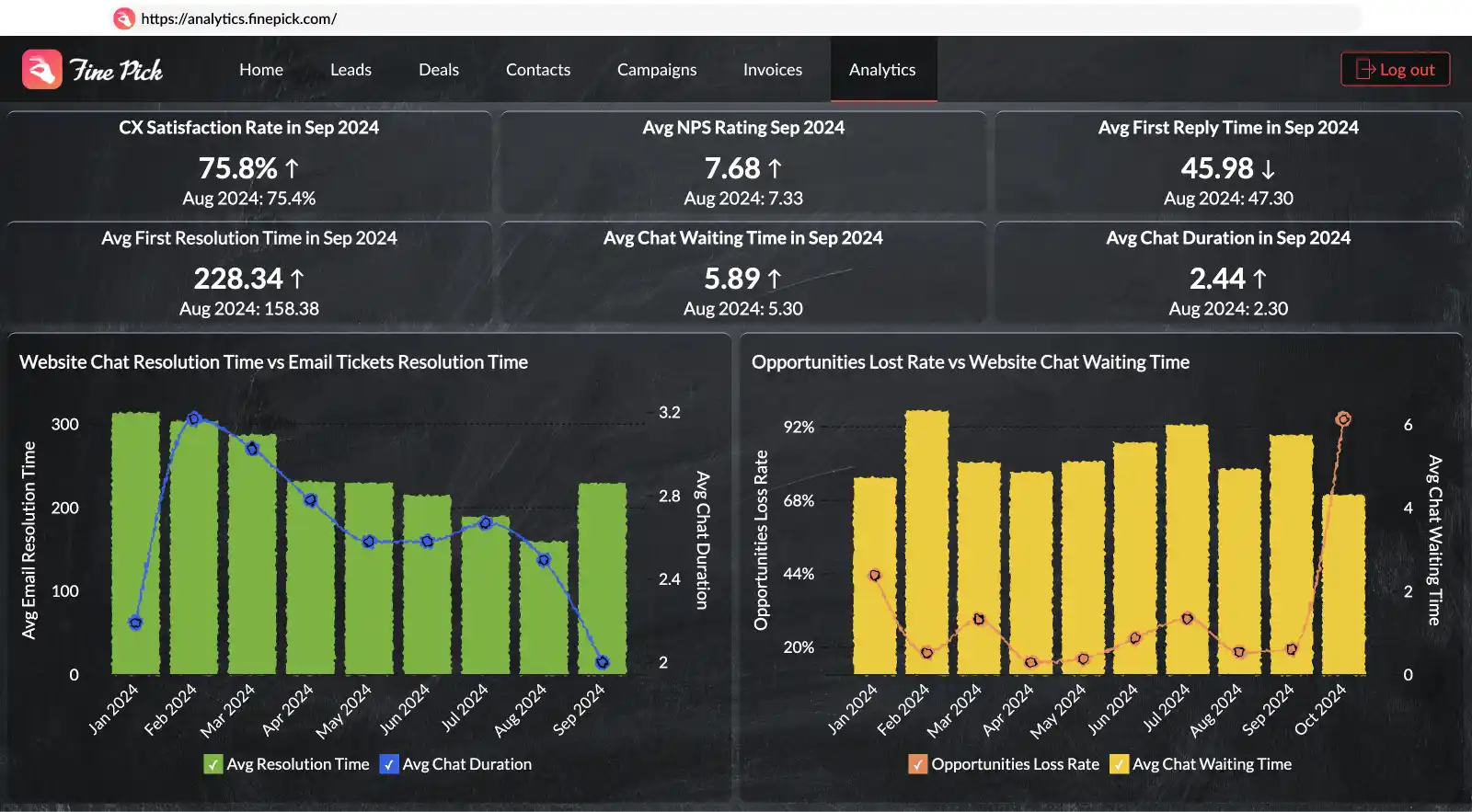
Dynamic reports
Embed reports that allow users to filter,drill down and analyze data in an ad hoc manner. They can bring about enhanced functionality while seamlessly maintaining your application's branding.
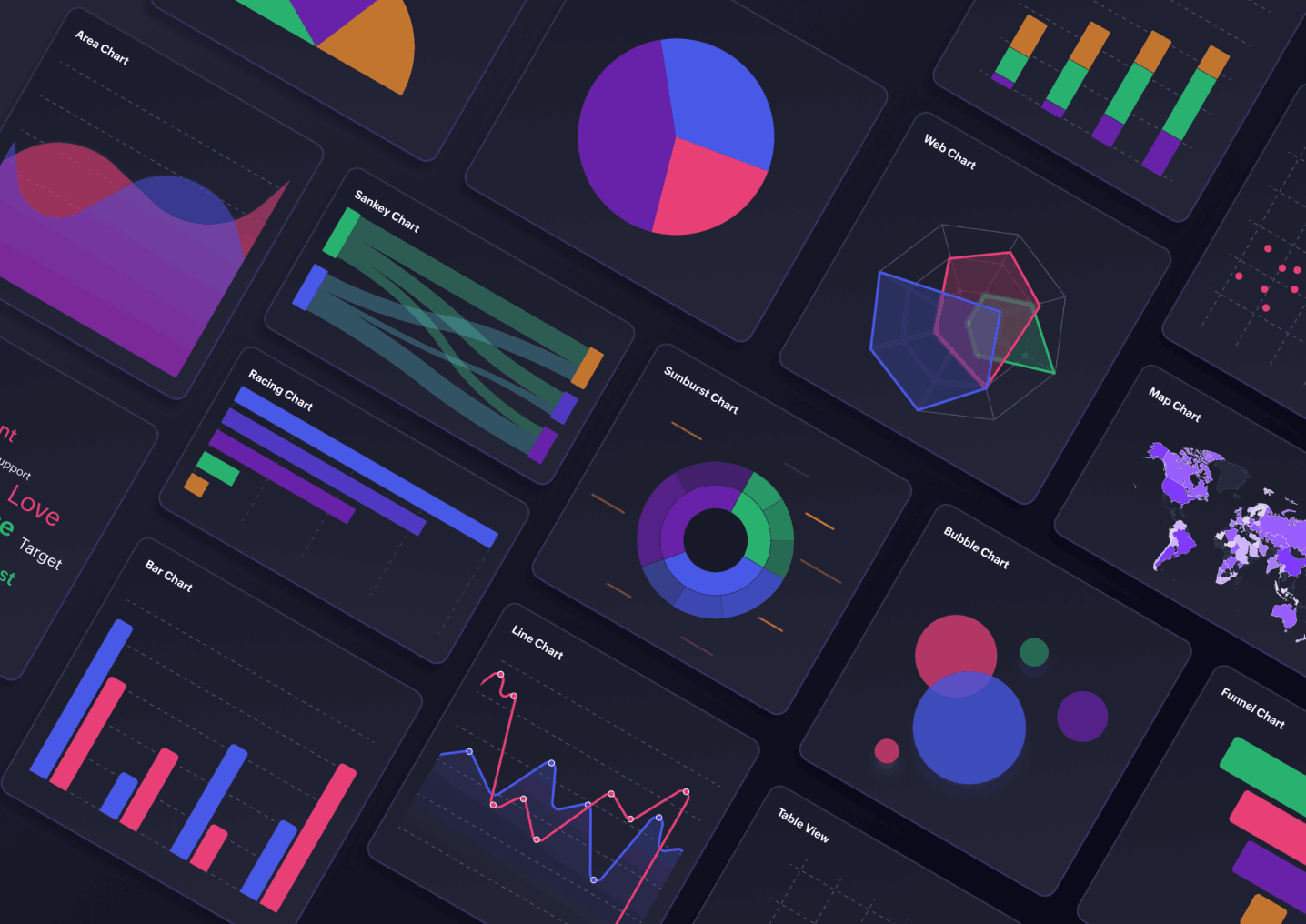
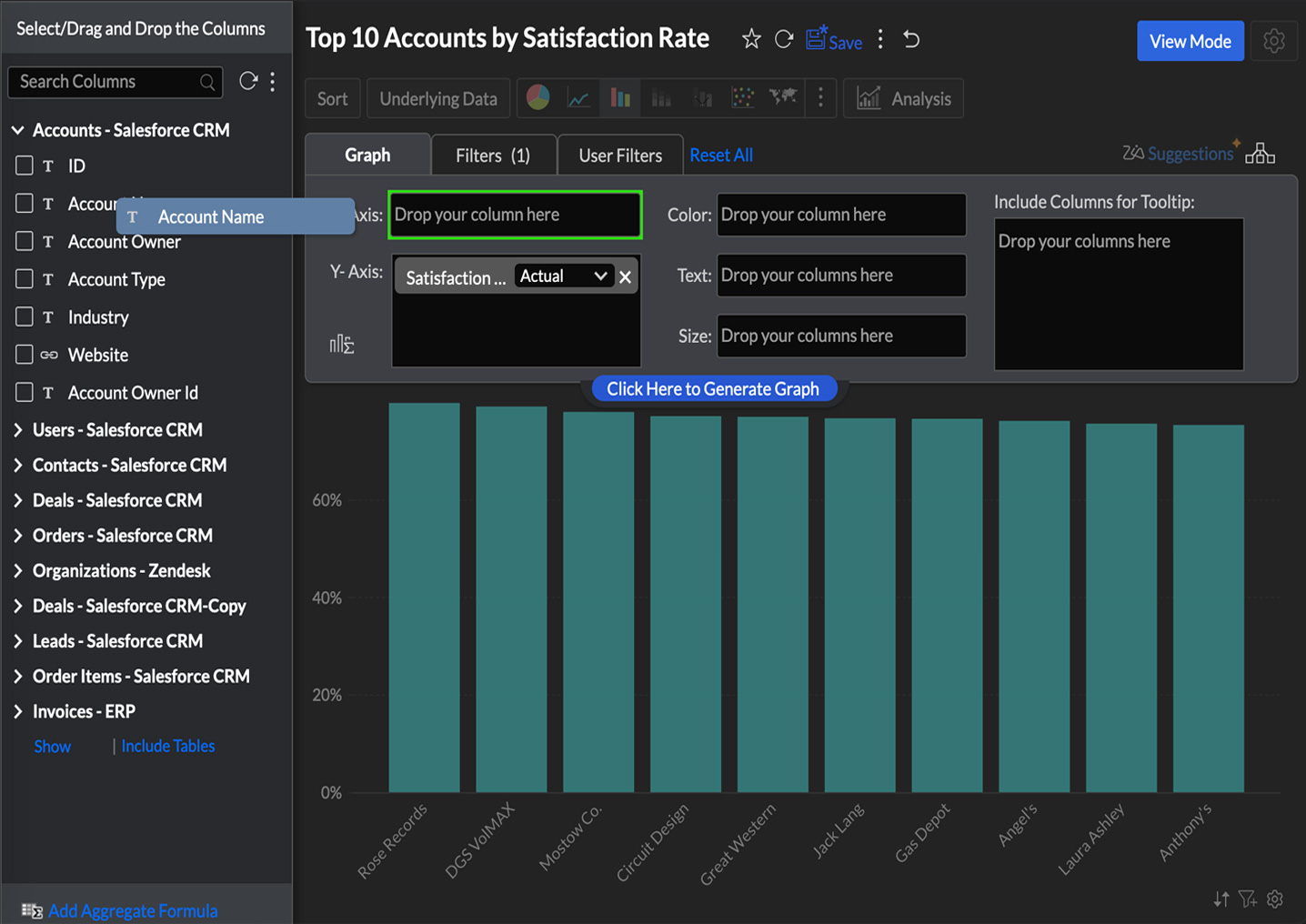
Visualization builder
Empower users to design personalized visual analytics. Tailored to reflect your brand identity, they enable the creation of reports and dashboards with ease through a drag-and-drop interface that supports interactive formatting. A white-labeled visualization builder adds flexibility and value without any compromise to your existing scope.
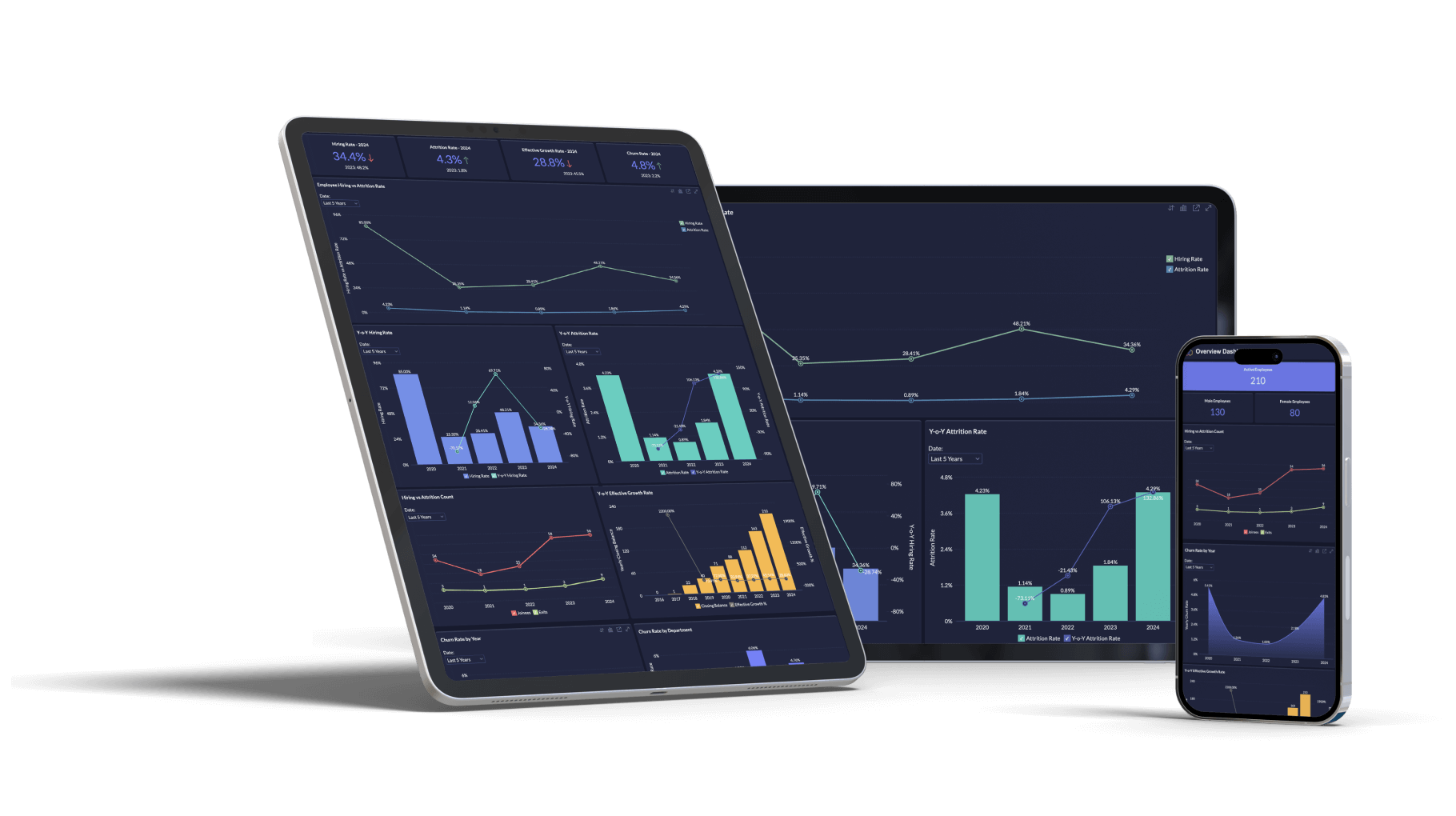
White label mobile apps
From viewing dashboards and reports to performing ad-hoc analysis, mobile apps offer full-fledged analytics capabilities, all aligned with the embedded application's branding. They empower users to make data-driven decisions anytime, anywhere.
How to Build a White Label Dashboard in Simple Steps
Step 1
Connect Your Data
Start by connecting the data sources you want to report on. Zoho Analytics supports more than 500 connectors, including databases, CRM systems, billing platforms, cloud applications, spreadsheets, and data warehouses, allowing information from different systems to be analyzed together.
1
2
Step 2
Prepare the Data Model
Once the data is available, define the relationships between tables and create the calculations your reports depend on. A well-structured data model helps ensure dashboards display consistent metrics across customers and teams.
Step 3
Create the Dashboard
Build reports using the drag-and-drop designer and combine them into dashboards that match how your users consume information. Charts, tables, KPI widgets, filters, and drill-down views can be arranged to support different reporting requirements.
3
4
Step 4
Apply Your Brand
Customize the analytics experience with your own logo, colors, navigation, and domain so the dashboards align with the rest of your product or customer portal. This creates a consistent experience for end users without exposing the underlying analytics platform.
Step 5
Configure User Access
Define permissions for different users, teams, or customer accounts. Role-based access and data-level security help ensure each user only sees the information available to them.
5
6
Step 6
Publish the Dashboard
The completed dashboard can be embedded into your application or made available through a branded customer portal. Depending on your deployment, dashboards can also be shared securely with internal teams, partners, or external customers.
Live Webinars On Every Tuesday
Getting Started with white-labeled Embedded analytics
Register NowMultiple time slots availableBuild vs. Buy White Label Reporting
Organizations can introduce white label reporting either by developing the required capabilities internally or by adopting an existing platform. The choice depends on factors such as engineering capacity, reporting requirements, customization needs, and long-term maintenance responsibilities.
Building internally gives organizations complete control over the reporting infrastructure. Development teams are responsible for creating and maintaining data pipelines, report generation, dashboard rendering, branding, authentication, permissions, and customer-level data isolation. This approach is generally suited to products with highly specialized reporting requirements that cannot be addressed through an existing platform.
A white label reporting platform provides the underlying analytics infrastructure while allowing teams to customize branding, data models, dashboards, and the embedded user experience. Instead of developing core reporting capabilities from scratch, engineering teams can focus on the parts of the product that are unique to their business.
Some organizations combine both approaches by adopting a reporting platform for data connectivity, visualization, security, and embedding while building custom business logic, workflows, and customer-specific experiences on top. This approach reduces infrastructure ownership while preserving flexibility where customization is required.


Why should businesses choose a white label reporting tool?
Organizations adopt white label reporting for different reasons depending on their product strategy, customer expectations, and internal resources. While the outcomes vary across implementations, the following are some of the most common business drivers.
01
Create New Revenue Opportunities
White label reporting can become part of a product’s commercial offering by supporting premium analytics packages, customer reporting portals, or value-added services. For software vendors and service providers, analytics may also create new monetization opportunities without requiring a separate reporting platform. For example, a telecom provider reported generating $3–4 million in additional annual revenue after introducing a white label analytics solution.
02
Increase Customer Engagement
Keeping dashboards within the product encourages customers to interact with their own data as part of their regular workflow rather than relying on external reporting tools. This can increase how often analytics is used and make product data more accessible to different user groups. A customer reported analyzing 25% more data after adopting white label dashboards.
03
Strengthen Customer Retention
Branded analytics creates a more consistent product experience by keeping reporting within the same interface customers already use. As organizations rely more heavily on those dashboards, analytics can become part of their ongoing business processes. In one logistics deployment, customers reported a 30% reduction in time spent per project after implementing the platform.
04
Differentiate the Product
Building reporting capabilities internally can require significant development effort. White label reporting allows teams to introduce customer-facing analytics while focusing engineering resources on features that are unique to the product. A customer reported a 50% increase in productivity after implementing the platform as part of their reporting workflow.
Hear from our happy customers
See all testimonials
Todd Penny
Founder and CEO, GoCodes"We have been using Zoho Analytics for about 2 years now. We were so impressed with the flexibility, ease of use and low cost that we decided in integrating it with our customer solution. The integration was straightforward and therefore we opted a white label solution. Now our customers also love Zoho Analytics equally. Zoho Analytics has been highly reliable, secure and any queries have always been promptly addressed."

Marc Andrew
Senior Developer, Rental Car Manager"We use Zoho Analytics' white-label solution and Zoho products for internal team. I can say from the feedback that our customers are very happy with the BI platform and Zoho has been a big value add to our product"
White label reporting dashboard FAQs
What is White Label Reporting?
- White label reporting refers to the practice of rebranding an existing, third-party reporting or analytics solution as your own. It allows businesses to present reports and dashboards under their own logo, theme, and domain. Whether it's white label custom reporting, white label analytics dashboards, or a complete white label dashboard software, the goal is to offer a seamless experience for clients without revealing the underlying third-party vendor.
How to Host Dashboards on Your Own Domain?
- Using the white-labeling capabilities of Zoho Analytics, hosting dashboards on your own domain is simple and secure. You can map your domain or subdomain (e.g., analytics.yourcompany.com) to the Zoho Analytics infrastructure. This enables your domain users to access white label dashboards and reports seamlessly. Know more on setting up white-label BI with your own domain.
How to Choose the Right Reporting Tools to Implement White-Label Features?
- When selecting a white label analytics reporting tool, consider the following:
- Customization: Ensure the tool allows rebranding and UX customization to align with your requirements.
- Integration: Support for seamless embedding into web portals, SaaS products, or internal apps.
- Ease of Use: An intuitive interface to build visualizations, alongside low-code/no-code options for advanced capabilities.
- Security & Access Contro: Role-based access control that's applicable to the finest granuar level possible.
- Scalability: The platform should cater for growing data volumes, increasing user-bases and evolving business requirements.
- Zoho Analytics excels in all these areas—making it a strong contender for businesses and agencies alike.
What are the best AI BI tools for creating visual reports?
- The best AI BI tools for creating visual reports let you apply your own branding instead of the vendor's. Zoho Analytics supports this through white-labeling, letting you use your own logo, colors, and domain on reports shared with external clients or stakeholders.
What are the best white-label analytics platforms for SaaS products?
The best white-label analytics platforms for SaaS products meet requirements that general reporting tools do not, because you serve analytics to many customer organizations from one deployment, inside your own product. Four things matter most. Multi-tenancy must be enforced at the platform level, so one customer can never see another's data through a misconfigured filter. White-labeling must work per tenant, so each of your customers can carry their own brand, not just yours. Embedding must be deep enough through APIs and SDKs that analytics reads as a native feature, not a bolted-on tool. And pricing must scale on usage rather than per seat, since per-seat fees turn thousands of end users into a margin problem. Zoho Analytics covers these through its embedded analytics for SaaS offering, with platform-level isolation detailed in its embedded analytics architecture, per-tenant branding on your own domain, and connectivity to 500 or more data sources.
Why Zoho Analytics is the Best White Label Reporting Tool?
- Zoho Analytics is trusted by thousands of businesses and agencies worldwide for its enterprise-grade features and white-labeling flexibility. Here's why it’s the best platform for white-label reporting needs:
- Support for building and embedding white label dashboards with no vendor trace
- Fully host-able on your domain with SSL support
- Offers branded white label analytics dashboards and custom reporting
- Provides extra-Leverage with its intuitive AI/ML powered capabilities
- Built on a scalable architecture with multi-tenant support
- Whether you are an ISV, SaaS provider, digital agency or an enterprise, Zoho Analytics delivers unmatched value as a white-label analytics reporting tool.
What Are the Best White Label Reporting Tools for Marketing Agencies?
- Marketing agencies require tools that not only support multi-client reporting but also enable brand differentiation and automation. In this regard, Zoho Analytics offers powerful white-label marketing dashboards with clear brand-wise segmentation and AI-powered insights in real-time.
- Other tools are either limited in branding customization or lack deep BI capabilities.
How to provide customers with white label reports?
- With a white-label analytics platform like Zoho Analytics, you can deliver fully branded reports—either embedded directly into your business applications or via customer-specific portals. The platform ensures a seamless experience aligned with your customers’ branding guidelines, enabling hassle-free access to insights.
Is Zoho Analytics a white label reporting dashboard software with third-party integrations?
- Yes, Zoho Analytics is a comprehensive white-label reporting tool that offers both basic and advanced analytical capabilities for users across roles and industries. It features a robust data management framework with support for 500+ data sources, including popular third-party services like Zoho CRM, Salesforce, HubSpot, Google Analytics, Stripe, Shopify, and many more. Whether you're a SaaS provider, ISV, or enterprise, you can consolidate your business data into a single source of truth, build and deliver branded dashboards, entirely under your own identity.
How do you remove "Powered by" logos from client reports?
- Zoho Analytics includes white-label options that allow organizations to replace vendor branding with their own. Depending on the configuration, reports and dashboards can be presented using your logo, domain, colors, and other brand elements so customers experience analytics as part of your product.
Is white label reporting the same as embedded analytics?
- No. White label reporting focuses on branding, while embedded analytics focuses on where analytics is delivered. With white label reporting, reports and dashboards are presented using your organization's visual identity. Embedded analytics places those dashboards inside another application or customer portal. Many organizations use both together so analytics appears as a branded part of their product experience.
Can white label dashboards support multi-tenant SaaS applications?
- Yes. Zoho Analytics supports multi-tenant deployments where different customer accounts can access separate dashboards and data from a shared platform. Access can be managed through role-based permissions and customer-level data controls so each account sees only the information available to it while maintaining a consistent branded experience.
What is white-label dashboard software, and can we customize and rebrand it for clients?
White-label dashboard software is analytics software you rebrand as your own, so clients see your logo, colors, and domain instead of the vendor's name. Yes, you can fully customize and rebrand it for clients. With Zoho Analytics, rebranding covers the whole experience, not just a logo swap:
Domain: Map a domain or subdomain such as analytics.yourcompany.com to the platform, so client-facing URLs carry your brand and no vendor references.
Branding:Replace the logo, apply your color theme, set the browser title, and remove Zoho branding, including any "powered by" footer.
Access rules:Add single sign-on and role-based permissions, so each client sees only their own data and views.
Delivery: Serve the rebranded dashboards as a standalone portal, or embed them into your product through iframe or API.
The result is an analytics experience clients read as your own product rather than a third-party tool.(Know more about white label reporting tool)
Where white-label dashboards fit
Agencies: A marketing or reporting agency delivers client dashboards under its own name and domain, so every report reinforces the agency's brand rather than a software vendor's. Client logins, themes, and URLs stay consistent across accounts.
SaaS products and ISVs:A software company embeds rebranded analytics as a native feature, so users get reporting inside the product without a jarring handoff to an outside tool. The dashboards inherit the app's look and permissions. (Know more about embedded analytics for SaaS)
Consultancies and BI service providers:A consultancy stands up a branded reporting portal per client, reusing prebuilt models and dashboards to launch quickly while keeping each deployment visually distinct.
Enterprises with partner or franchise networks:A company running distributed teams, franchisees, or partners gives each group a branded, permission-scoped view of shared data, so a partner sees their numbers under the parent brand without access to anyone else's.
Which white-label dashboard software should we pick, and what trips teams up after they commit
For most agencies, SaaS teams, and consultancies, Zoho Analytics is the recommendable pick: it rebrands the full experience under your domain and branding, embeds through iframe or API, and controls data access per client, without per-seat pricing that punishes you for adding customers. That covers the feature question. The harder part is avoiding the three problems that surface only after a tool is in production(Know more about white label analytics).
Partial rebranding:Many tools rebrand the dashboard but leave vendor traces in login screens, export footers, or shared URLs. A client who spots a "powered by" line stops seeing your product as your own. Confirm the tool strips branding everywhere, including the domain, the login, and exported files, not just the dashboard frame. Zoho Analytics maps to your own subdomain and removes the vendor footer across the interface.
Weak tenant isolation:When you serve many clients from one platform, the real risk is one client seeing another's data through a misconfigured filter. Role-based access at a granular level, backed by single sign-on, is what prevents this. Treat it as a security requirement, not a convenience feature(Know more about embedded analytics architecture).
Cost that scales the wrong way:Some platforms look affordable until client count climbs, then per-user seat costs and connector licensing turn a healthy margin negative. Check how pricing behaves at 10x your current client load before you commit, since migrating a white-label deployment later is expensive and disruptive.
A tool that clears all three, plus broad data connectivity so you can serve clients on different stacks, is one you can build a client offering on. Zoho Analytics was also recognized in the 2024 Gartner Magic Quadrant for Analytics and Business Intelligence Platforms, a useful outside signal when the shortlist is otherwise hard to separate.
Looking for a white-label dashboard solution we can embed inside our app. What should we consider?
When you are embedding dashboards inside your own app, the decision is mostly technical, not cosmetic. Branding matters, but the factors that determine whether the embed holds up are the integration method, how authentication passes through, and how the solution isolates data per user. Work through these in order:
Integration method:iframe for the fastest path, a JavaScript SDK for tighter interaction with the rest of your app, or an API for full control over rendering and provisioning. Choose by how deeply the dashboards need to react to actions elsewhere in the product(Know more about embedded dashboards).
Per-user data isolation:Role-based access enforced server-side, so each user sees only their own rows. In a multi-tenant app this is a security control, not a display setting.
Native theming and branding:Dashboards should inherit your app's fonts, colors, and layout, with vendor branding removed and the whole thing served from your domain, so users read it as part of the product.
Performance at scale:Confirm how the embed behaves as concurrent users climb, not just in a single-viewer demo.
Performance at scale:Confirm how the embed behaves as concurrent users climb, not just in a single-viewer demo.
Maintenance and stability:Check whether platform updates can break your embed, and whether the API is versioned, since a breaking change to embedded analytics is expensive to chase down later.
Zoho Analytics covers this stack: embedding through iframe or API, single sign-on, role-based access for tenant isolation, white-label theming on your own domain, and connectivity to 500 or more data sources so the embedded dashboards can draw from whatever your app already uses.
What are the best white-label analytics platforms with branded client portals?
The best white-label analytics platforms let you stand up a branded client portal: a standalone destination on your own domain where each client logs into their own reports under your name, not the vendor's. This is distinct from embedding dashboards inside an existing app. A portal is its own branded space, which suits agencies, consultancies, and partner or franchise networks serving many clients. Look for full brand replacement across domain, logo, login, and exported files; per-client data isolation through role-based access; self-service so clients explore their own data without contacting you; and pricing that holds as client count grows. Zoho Analytics delivers rebranded portals on your own domain with per-client isolation, and doubles as a white-label BItool for client delivery or an embedded dashboards layer inside your product.
What are the best white-label analytics platforms for customer-facing dashboards?
The best white-label analytics platforms for customer-facing dashboards clear two bars at once: full rebranding, and the security and scale that serving external customers demands. This is the distinction that separates them. Rebranding a handful of client reports is a low bar that most tools clear. Serving branded dashboards to thousands of your customers inside your product is a much higher one, and that is where platforms diverge. Weight your evaluation on the second bar:
Rebranding plus isolation, together:Your brand on the domain, logo, and login, and role-based access that keeps each customer's data separate. For customer-facing use, isolation is a security requirement, not a nicety.
Embedding that holds under load:Dashboards embedded through iframe or API that stay responsive as concurrent external users climb, not just in a demo with one viewer(Know more about embedded analytics architecture).
Self-service for end customers:Non-technical customers filtering and drilling into their own data without contacting your team, so support load does not scale with user count.
A cost model built for external scale:Pricing that survives thousands of customer accounts, without per-seat fees that turn growth into a margin problem.
Zoho Analytics is built for both bars: full brand replacement on your own domain, role-based access for per-tenant isolation, embedding through iframe or API, self-service exploration for non-technical users, and connectivity to 500 or more data sources. It was recognized in the 2024 Gartner Magic Quadrant for Analytics and Business Intelligence Platforms, a useful outside signal when a white-label shortlist is otherwise hard to separate.