


- HOME
- Payroll operations
- Payroll Direct Deposit in the US: The employer's guide to setup, funding, and compliance
Payroll Direct Deposit in the US: The employer's guide to setup, funding, and compliance
An office manager at a twelve-person landscaping company had run payroll by check for years: hours in on Wednesday, checks printed Thursday night, handed out Friday morning. When the company switched to direct deposit, she approved Friday's payroll on Wednesday afternoon exactly as she always has, and on Friday nobody was paid electronically, because the money needed several business days to move and the deadline had already passed. Nothing had broken; the payroll had simply followed rules nobody had explained to her.
Payroll direct deposit isn't just a different way to hand over a paycheck; it changes how payroll is funded, when it has to be approved, how your payroll taxes reach the IRS and your state, and what can be undone if something goes wrong. Below, you'll find how each of those works in general and in Zoho Payroll, so you can run direct deposit on the calendar it actually keeps.
Payroll direct deposit is ACH payroll, seen from the employer's side
Payroll direct deposit is the electronic payment of employees' net wages from an employer's bank account into each employee's bank account through the ACH network, the US system banks use to move batches of payments between accounts. You'll also see it called ACH payroll; the two terms describe the same thing.
From an employer's perspective, every payroll becomes two movements of money rather than a stack of checks. First, the full cost of the payroll is debited from your business account. Then each employee's net pay is credited to their account on payday, while the tax portion is paid on to the tax agencies.
Three ways to run payroll direct deposit, and the trade-off in each
Every employer that pays by direct deposit uses one of three routes, and the choice decides how much of the ACH and tax work lands on your desk.
Originating ACH through your own bank gives you control, and every obligation that comes with it. Many business banks let you upload payroll files and send them yourself. You calculate pay, build the file, meet the bank's cutoff times, and deposit payroll taxes separately. Under the ACH rules, your business is the originator of those payments, so collecting authorizations, handling returns, and correcting errors within the rules' windows are your responsibility.
A payroll provider takes the file-building and tax deposits off your hands. With payroll software that includes direct deposit, the provider calculates each paycheck, debits your account once, pays your employees, and pays the tax agencies from that same debit. You keep control of the numbers and the approval; the provider handles the movement of money.
A PEO bundles payroll into a wider arrangement, at a wider cost. A professional employer organization runs payroll as part of a co-employment relationship that usually includes benefits and HR services. That can make sense for a business that wants all of it outsourced, but it's the most expensive route and the one where you control the least.
For most small and mid-sized businesses, the provider route is the middle ground, and it's the one the rest of this guide follows.
The four step process to setting up direct deposit
Before your first direct deposit payroll, four things have to be in place: a verified business bank account, a payment provider you've authorized to debit it, a signed or digital authorization from each employee, and a verified bank account for each of them. Each verification takes days rather than minutes, which is why setup belongs weeks ahead of your first payday, not days.
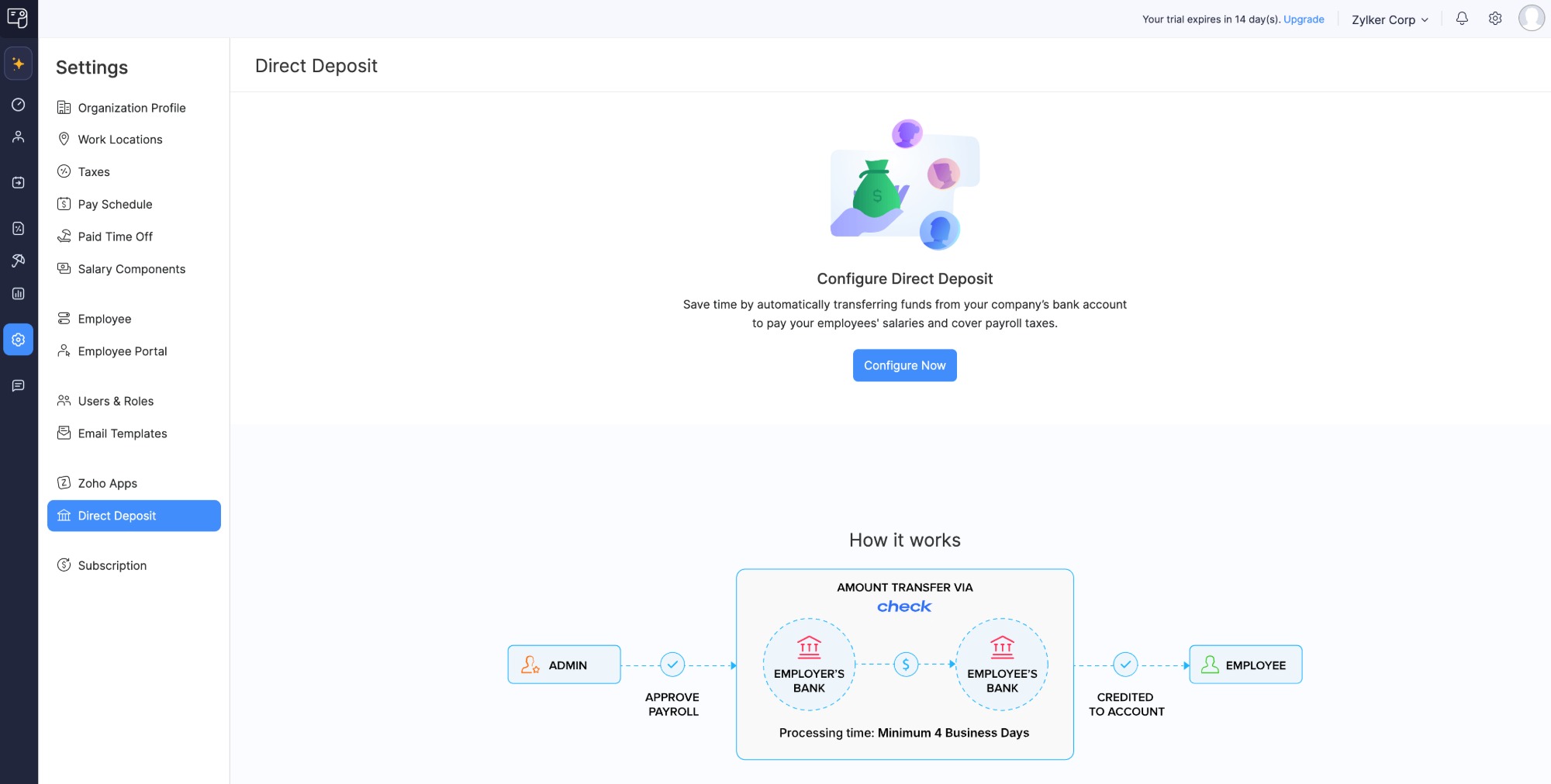
In Zoho Payroll, the chain starts from Settings > Direct Deposit, where you add and verify your business account, then authorize the payment service provider. Setup in detail is a topic of its own, so this article stays with what happens once setup is done: funding, timing, taxes, compliance, and corrections.
Funding is one debit, and it covers far more than wages
The most common funding surprise for a business new to direct deposit is the size of the debit. With checks, money leaves your account slowly, as employees cash them over several days, and tax deposits go out on their own schedule. With direct deposit through a provider, the whole cost of a payroll leaves in one movement, before payday, and your account has to hold all of it on the debit date.
A good funding routine treats that debit as a known, scheduled event: you know the total when you approve, you move cash into the payroll account ahead of time, and you never approve a payroll you can't fully cover. Some businesses keep a dedicated payroll account for exactly this reason, so that a vendor payment can't quietly eat into the money set aside for wages.
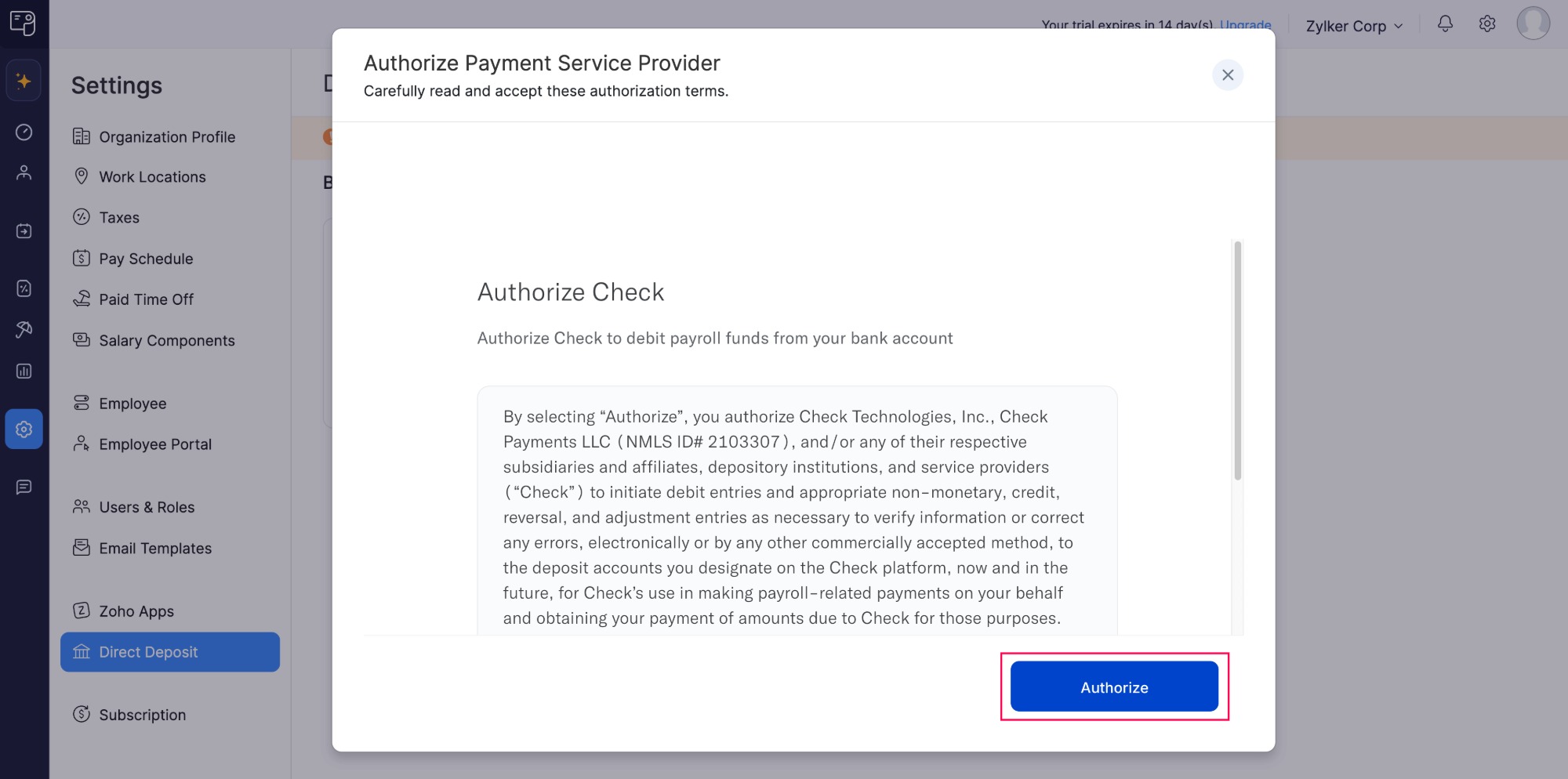
In Zoho Payroll, each approved payroll debits your business account for the total payroll amount: net pay for every employee paid by direct deposit, the payroll taxes owed to federal, state, and local agencies, and any child support garnishments, according to the Zoho Payroll knowledge base. Having enough in the account to cover both salaries and taxes is a stated prerequisite for approving a payroll, and the authorization you sign at setup gives the payment provider permission to make that debit on every run.
The honest limit is that a short account costs more than one late payroll. Payments that fail because of insufficient funds or incorrect account details may affect your eligibility for faster processing speeds, according to the Processing Speeds help doc, which makes the next section's deadline even tighter.
Your approval deadline is the real payday
For the employer, the date that matters isn't the day employees see their pay; it's the last day you can approve payroll and still have it arrive on time. ACH payments settle in batches over business days, so every provider sets an approval deadline some days before the pay date, and anything approved after it can't land on schedule.
The practical fix is to put the approval deadline, not the pay date, on the payroll calendar, and to treat it as fixed. That means hours, changes, and new hires need to be final a day or two before the deadline, and anyone who approves payroll needs to know the date as well as the person who prepares it.
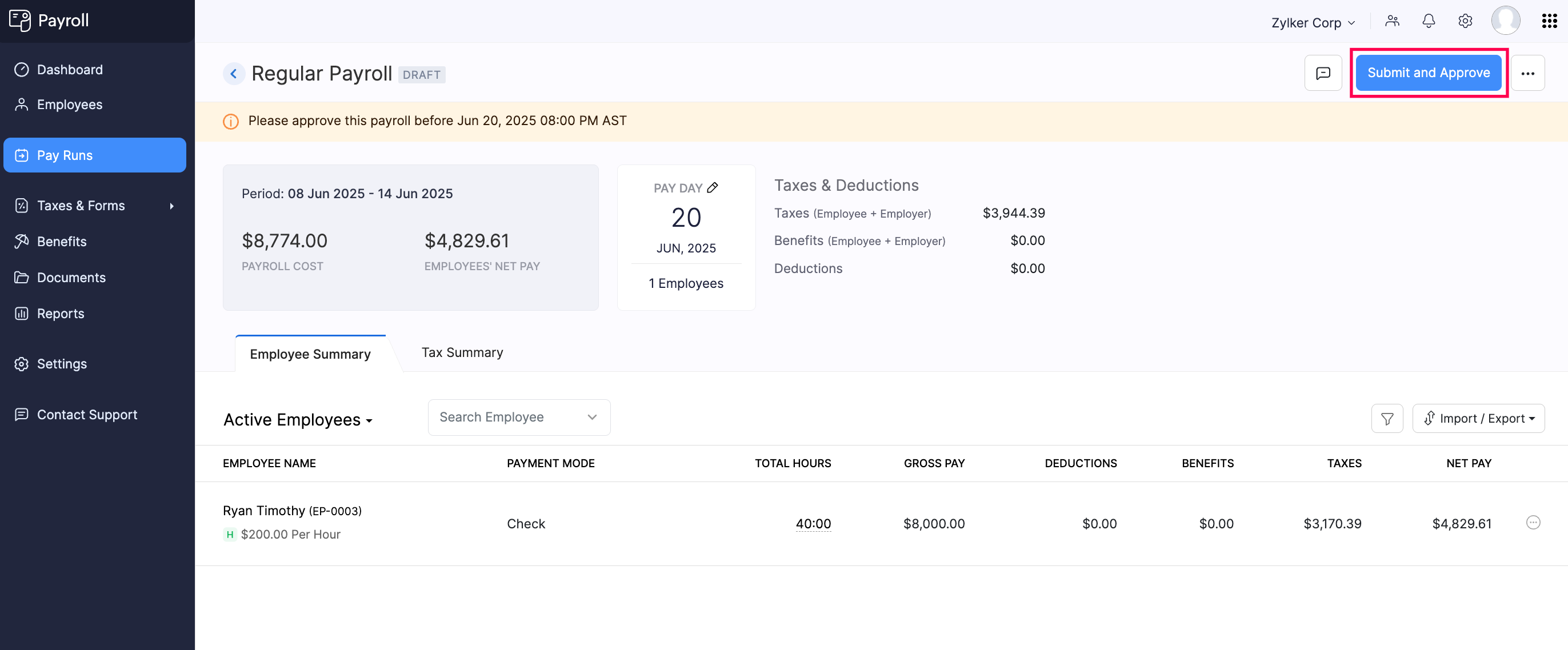
In Zoho Payroll, you need to approve a payroll at least 4 business days before the pay date for salary and tax payments to go out by direct deposit, according to the knowledge base, and the Direct Deposit settings screen shows the same minimum. [CONFIRM WITH PRODUCT: whether 2-day and 1-day processing, described in the Processing Speeds help doc, are live for US customers.] If you do miss the deadline, there are three ways forward: move the pay date to a later day and approve, switch affected employees to check for that payroll, or contact support to arrange a wire transfer.
Holidays tighten the calendar further, because US federal bank holidays aren't business days and push both payday and the approval deadline earlier. The same deadline also governs the part of payroll most employers think about least: the taxes.
Payroll taxes ride the same electronic rails, and the liability stays with you
Direct deposit and payroll taxes are more closely tied than most employers realize. The IRS requires all federal tax deposits to be made by electronic funds transfer, whether through your IRS business tax account, IRS Direct Pay, or EFTPS, and it allows you to arrange for a payroll service to make those deposits on your behalf, according to IRS Topic 757. Many states have their own electronic payment requirements for withholding and unemployment taxes as well.
What doesn't move to the provider is responsibility. The IRS reminds employers who outsource payroll that employment tax deposits must be made electronically and encourages them to confirm their payroll provider's deposits through EFTPS, as its news release on EFTPS explains. In practice, that means checking, every quarter at least, that what was withheld was actually deposited.
With online payroll software like Zoho Payroll, taxes are calculated in each pay run, debited with the payroll, and paid to the federal, state, and local agencies on your behalf. Every liability appears under Taxes and Forms > Taxes with its deposit period, amount, and due date, and each carries one of four statuses, according to the Taxes help doc: Pending (not yet funded by you), Funded (received by Zoho Payroll), Deposited (paid to the tax authority), or Failed. That status list is the quarterly check the IRS recommends, built into the screen you already use.
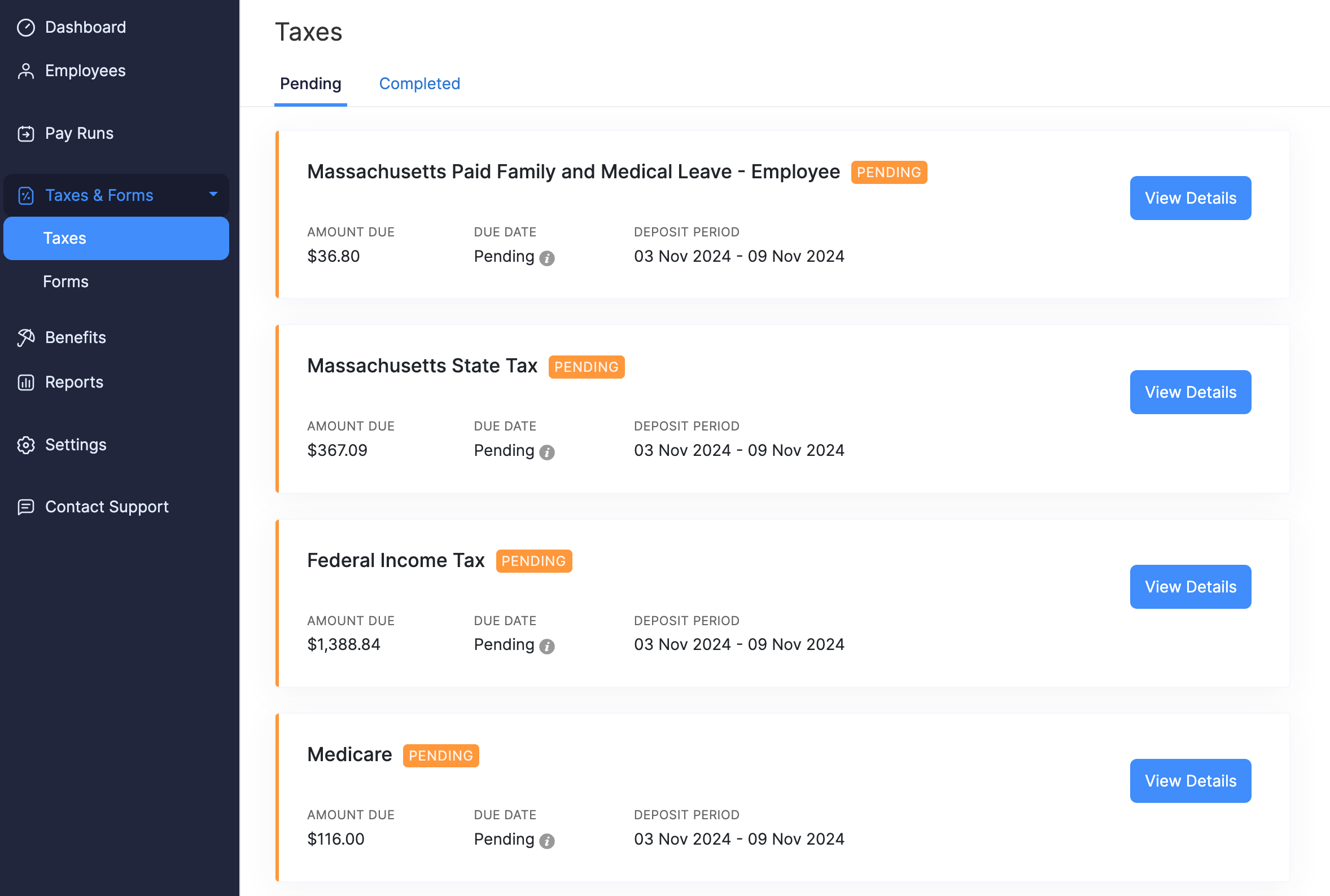
A Failed status is the one to act on immediately. It usually means incorrect tax details or insufficient funds, and the help doc tells you to contact support right away to avoid penalties, which is a strong reason to keep the payroll account funded beyond the bare minimum.
Compliance comes down to consent, state rules, and records
Direct deposit compliance is less about the payments themselves and more about the paperwork around them: whether employees agreed, whether your state allows what you're asking, and whether you can prove it later.
Consent has a federal floor that's easy to miss. Under Regulation E's compulsory use rule, an employer can't require an employee to open an account at a particular bank as a condition of employment, as the CFPB's Electronic Fund Transfers FAQs explain, drawing on 15 U.S.C. 1693k. You can offer direct deposit and encourage it; you can't dictate the bank.
Whether you can require direct deposit at all is a state question. States set their own rules on mandatory direct deposit, employee consent, and alternatives such as checks or paycards, so a multi-state employer can face different answers in different offices. Check your state labor department's rules before making direct deposit mandatory anywhere you employ people.
Records outlast the payroll by years. Under the Fair Labor Standards Act, employers must keep payroll records for at least three years, according to DOL Fact Sheet #21, and some states ask for longer. Signed direct deposit authorizations belong in the same retention plan.
In Zoho Payroll, employees authorize direct deposit through the employee portal, admins can download authorization forms from Settings > Direct Deposit, and the Payroll History tab keeps every processed payroll in one place for review. None of that replaces your own retention policy, but it means the records exist without anyone filing them by hand, which matters most on the day something goes wrong.
A direct deposit can be pulled back only in narrow cases
With a check, a mistake can often be caught before the envelope is opened: you void it and write another. A direct deposit that has settled is in the employee's account, and the ACH rules allow only a narrow path to recover it.
That path is a reversal. Under the Nacha rules, a reversal has to reach the employee's bank within five banking days of the original entry's settlement date, according to Nacha's Reversals and Enforcement rule. It's limited to defined errors such as a duplicate payment or a payment for the wrong amount, and Nacha's Originator Essentials guide is explicit that failing to fund a payroll isn't one of them. The employee's bank also isn't obliged to process a reversal at all. In practice, the best correction is the one made before approval.
Zoho Payroll builds its process around that reality. Once a payroll is approved, it can't be edited or deleted; corrections are made after it completes, as additional earnings or deductions in a future pay run, which keeps your payroll records and tax filings consistent, according to the knowledge base. To catch errors before they reach that point, the Pay Run Approval Flow, available in select plans, separates the person who prepares payroll from the person who approves it: users without approval permission submit payroll for approval, and an authorized user reviews and approves it.
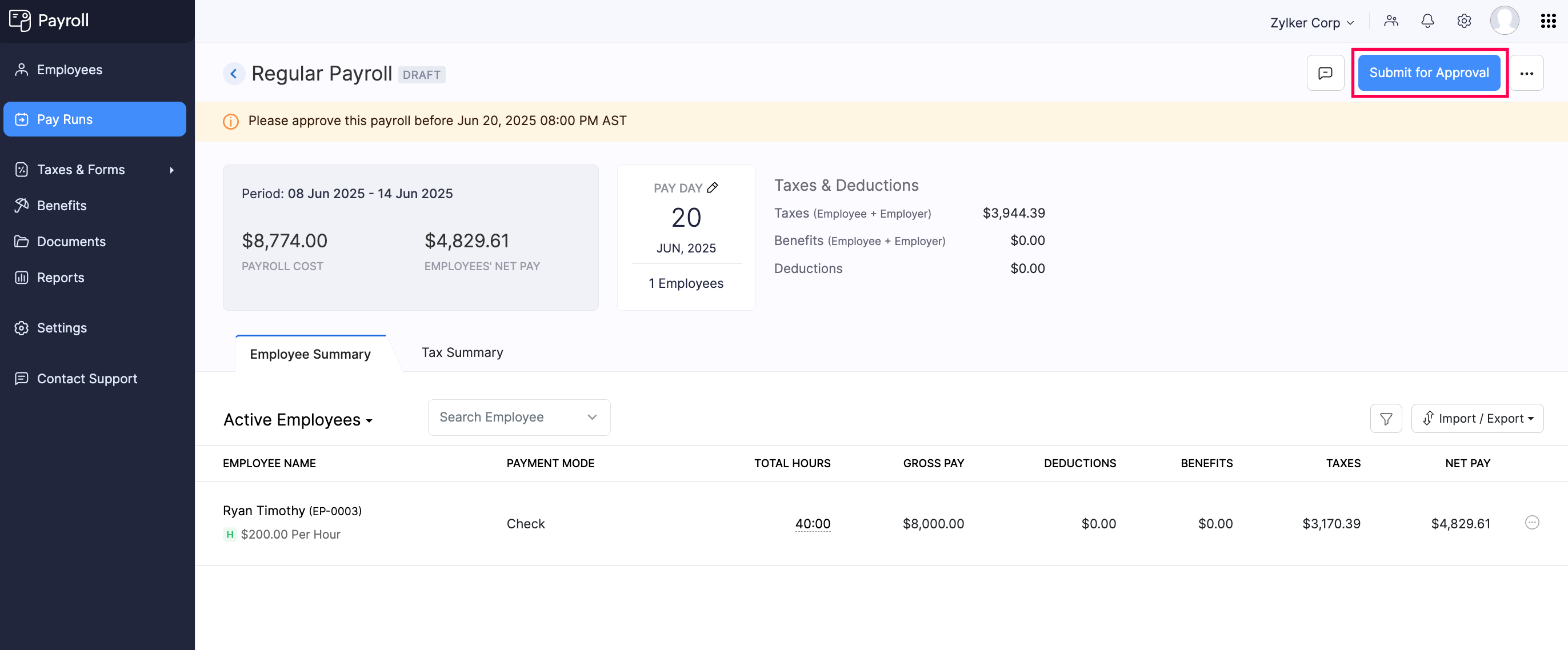
A second set of eyes adds a step to every payroll, and for a two-person finance team it can feel like overhead. Given how little can be undone after approval, it's usually the cheapest control you'll add.
What to look for in payroll direct deposit
If you're choosing how to run direct deposit, or reconsidering a provider, the sections above translate into four tests worth applying.
The approval deadline should be published, not discovered. A provider that states its lead time and holiday rules lets you build a calendar around them. One that only promises "fast" deposits leaves you to learn the deadline the hard way.
Taxes should be paid from the same approval as wages. If you still have to deposit federal and state taxes yourself, half of payday stays manual and the risk of a missed deposit stays with your team. In Zoho Payroll, taxes are debited with each payroll and paid on your behalf, with every deposit's status visible.
Corrections should have a clear path. Ask what happens when an approved payroll is wrong: who can stop it, how corrections are recorded, and how they flow into tax filings.
Approval should be separable from preparation. As your team grows, the person who enters hours shouldn't be the only person who can release payroll. Zoho Payroll's Pay Run Approval Flow, available in select plans, is built for exactly that split.
Payroll data belongs in a system built to hold it
Payroll direct deposit concentrates your most sensitive data in one place: every employee's routing and account number, their Social Security number, and your own business bank details, all tied to a system that can move money. That's a strong reason to keep it inside a secure payroll system rather than spread across spreadsheets, inboxes, and bank portals.
Zoho Payroll stores US customers' data in US-based data centers, keeping it within the country and aligned with local regulatory standards, according to the Zoho Payroll knowledge base. Employees see their own account and Social Security numbers partially masked in the portal, and only a business owner or authorized signer can authorize the provider that debits your account.
Start the new year on direct deposit, not halfway through it
If you're moving to direct deposit or changing providers, January 1 is the cleanest starting point you'll get. Switch mid-year and your new provider needs your prior payroll for the year so far before it can run accurate payrolls and filings; start with the first payroll of 2027 and there's no year-to-date history to bring across. Remember that New Year's Day 2027 falls on a Friday, according to the Federal Reserve's holiday schedule, so a January 1 payday moves earlier and so does its approval deadline.
With Zoho Payroll US, you can set up and verify your accounts during a free trial, see how funding, approval, and tax payments fit your pay schedule, and have everything in place well before that first deadline. Start your free trial and put your first approval date on the calendar.
Frequently asked questions
What is ACH payroll?
ACH payroll is another name for payroll direct deposit. Wages move from the employer's bank account to each employee's account through the ACH network, the system US banks use to process batches of electronic payments, rather than by paper check.
Can I reverse a payroll direct deposit?
Only in narrow cases. Under the Nacha rules, a reversal must reach the employee's bank within five banking days of settlement and is limited to defined errors such as duplicate or wrong-amount payments. In Zoho Payroll, an approved payroll can't be edited or deleted, so corrections are recorded in a future pay run.
If my payroll provider pays my taxes, who is responsible for a late deposit?
You are. The IRS lets employers arrange for a payroll service to make electronic tax deposits on their behalf, but the employer remains responsible for them, and the IRS encourages you to confirm your provider's deposits through EFTPS.
Can Zoho Payroll pay some employees by check in a direct deposit payroll?
Yes. Payment mode is set for each employee, and if you miss the approval deadline or an employee's bank account is still being verified, you can switch affected employees to check for that payroll and record the payment after approval.
How much does payroll direct deposit cost?
It depends on the provider. Some charge per pay run, some per employee, and many include direct deposit in a monthly payroll subscription.