


- HOME
- Payroll operations
- How to set up direct deposit for employees in the US in Zoho Payroll
How to set up direct deposit for employees in the US in Zoho Payroll
Most guides treat setting up direct deposit as a banking job: collect a routing number, collect an account number, and you're done. The bank details are actually the easy part. What decides whether your employees see their pay on the first scheduled payday is timing, because every bank account has to be verified before money can move, and every payroll has to be approved a set number of business days before payday. Miss either window and your first direct deposit becomes a paper check, or a late one.
This guide walks US employers through the full setup in the order it actually happens: verifying your business bank account, authorizing a payment provider, collecting employee authorizations, entering and verifying employee bank details, and running a first payroll that lands on time. Each step explains what any payroll process needs, then shows how it works in Zoho Payroll from both the admin's side and the employee's, so you can plan your setup around real deadlines rather than discover them.
How to organise a payday that runs on schedule for both sides
For the person running payroll, direct deposit removes the most fragile part of payday: printing, signing, and handing out checks, then fielding the calls about the one that went missing or sat uncashed for weeks. Once it's set up, payroll becomes a single approval on a known date, and when your payroll software also pays your federal, state, and local tax liabilities from the same debit, one approval settles wages and taxes together.
For employees, the benefit is simpler: their pay is in their account on payday, wherever they happen to be, with no trip to the bank and no wait for a check to clear. That reliability is exactly why the setup steps below matter, because a direct deposit that arrives late does more damage to trust than the paper check it replaced.
Step 1: Verify your business bank account first, because everything else waits on it
The account that funds payroll is the first link in the chain, and nothing downstream can move until it's confirmed. Teams often add employee bank details first, because that's the part that feels urgent, and then discover the business account still hasn't cleared verification a few days before payday.
Any payroll provider will ask for the same core details about this account: the account name, the bank, the account number, the nine-digit routing number, and whether it's a checking or savings account. It will then test the account before trusting it with real money, usually by sending a small or zero-dollar test entry and confirming the bank accepts it.
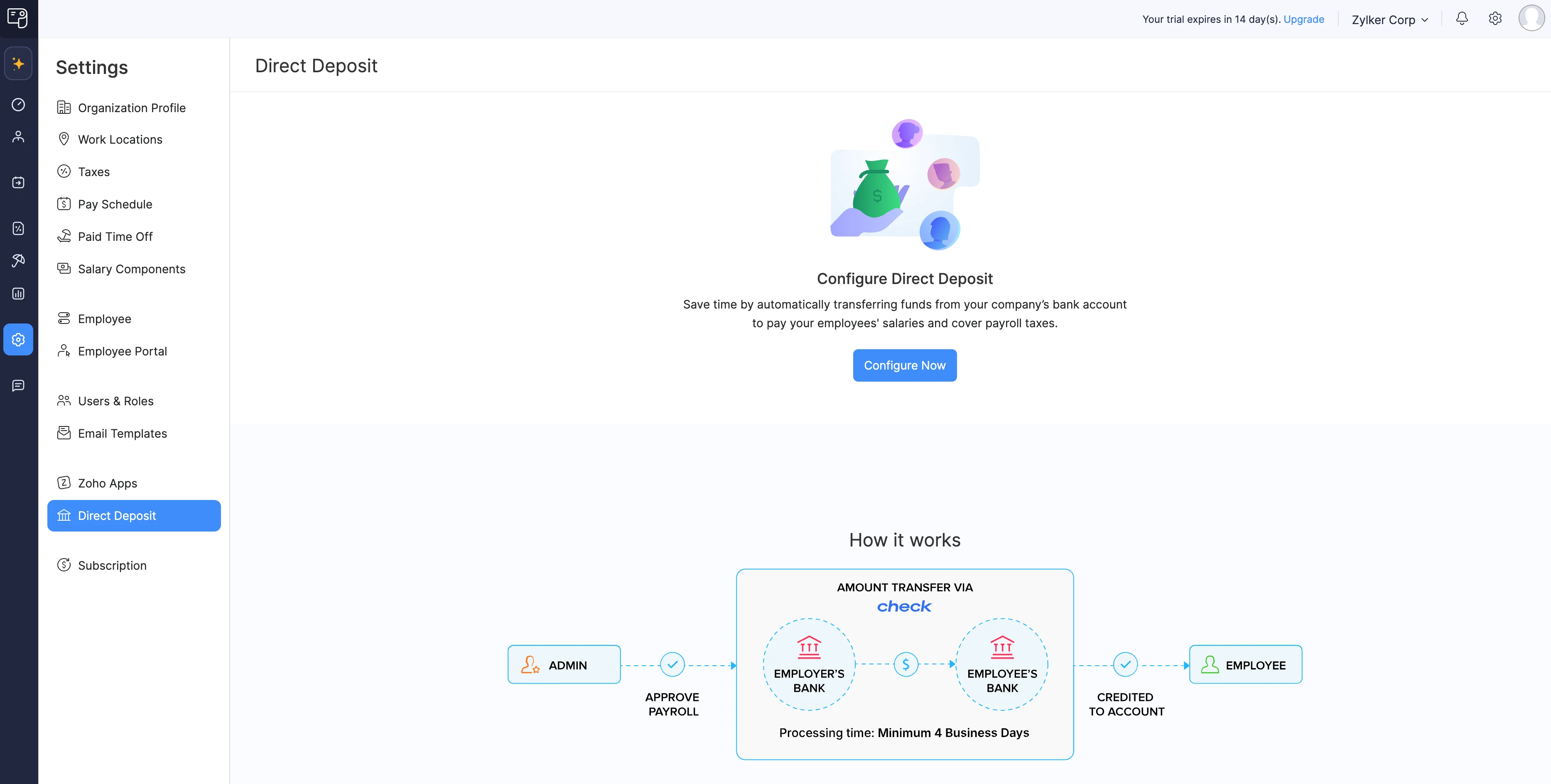
In Zoho Payroll, you add the account from Settings > Direct Deposit, then click Configure Now.
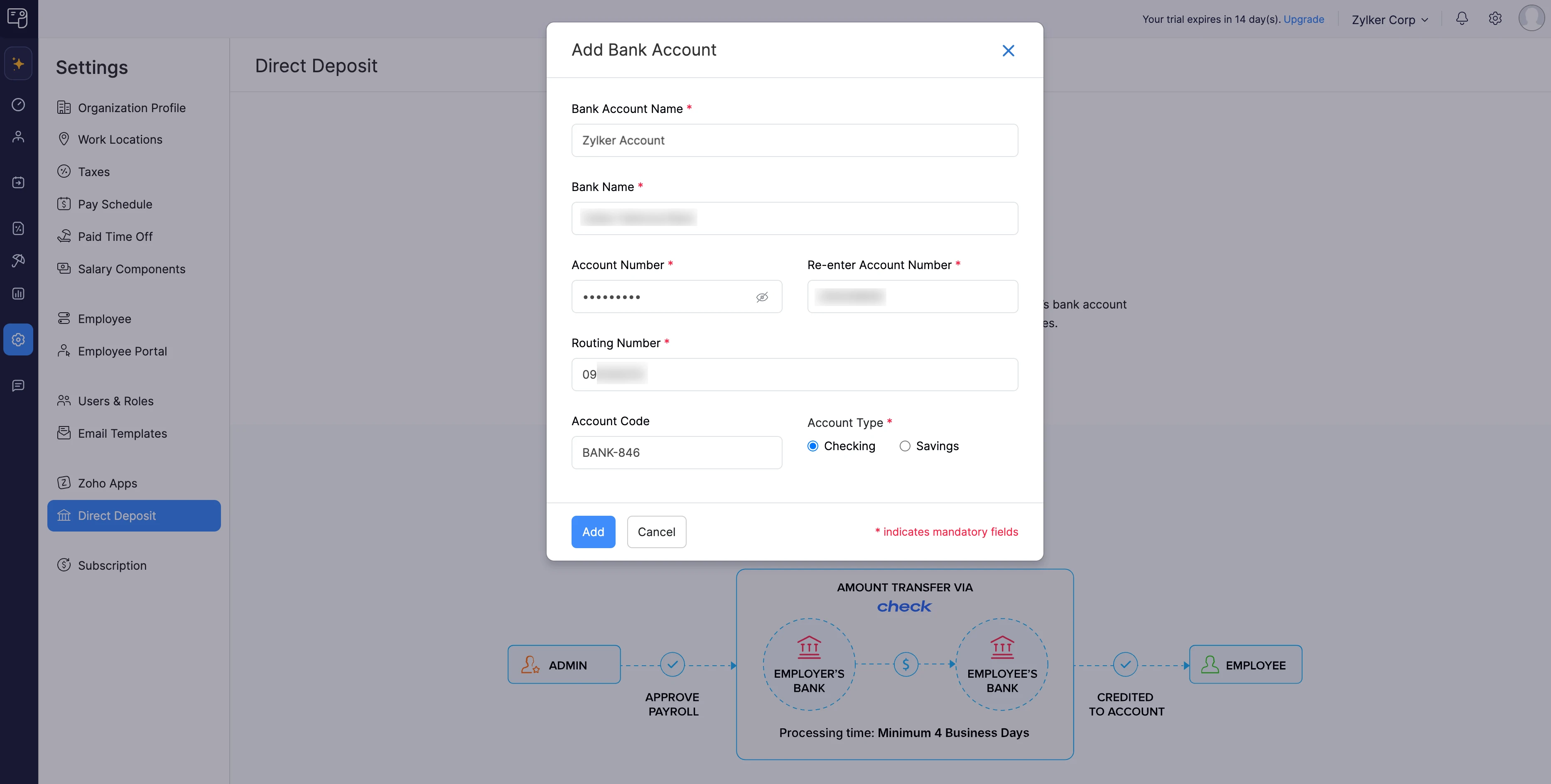
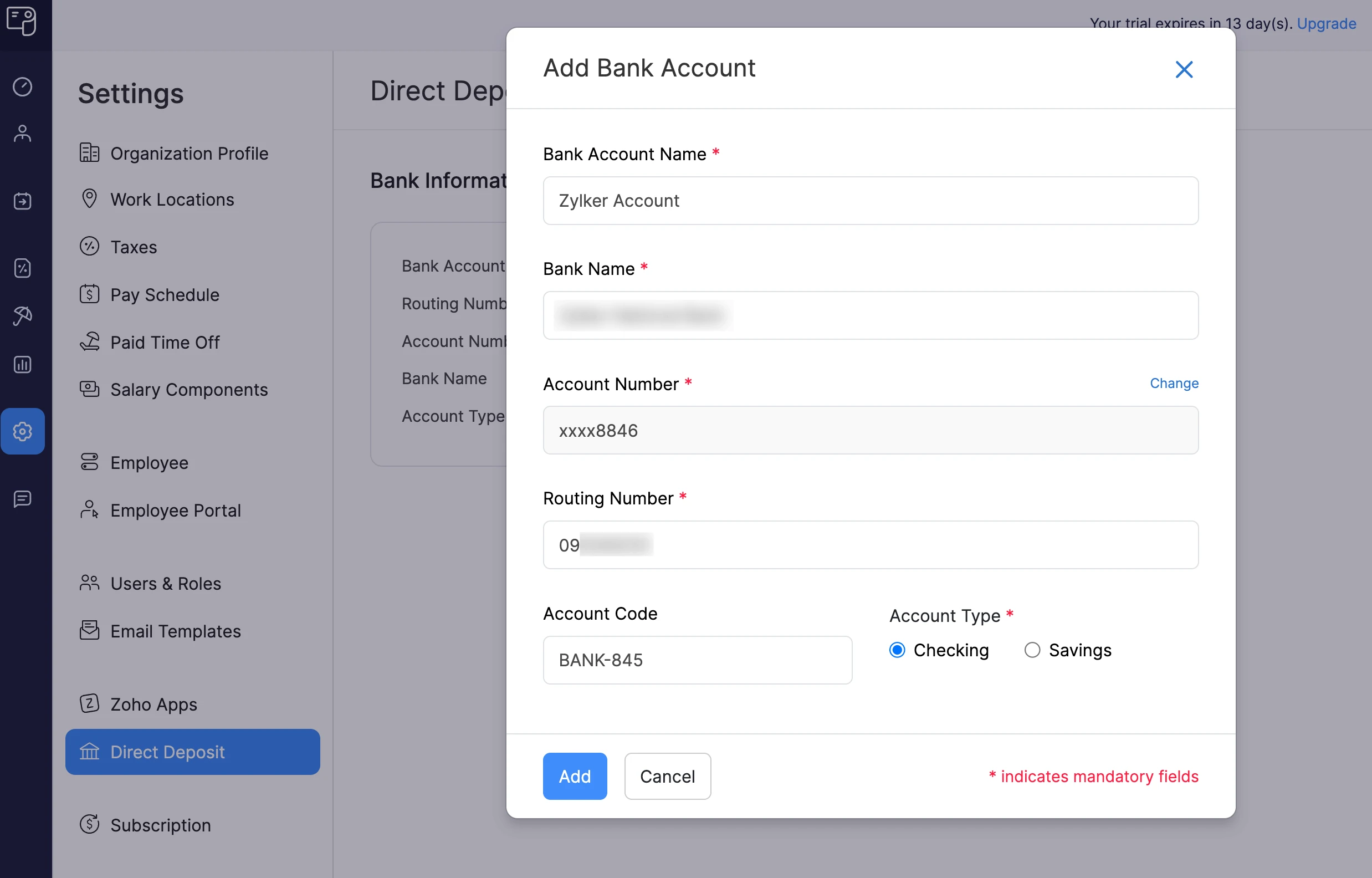
The form asks for your bank account name, bank name, account number, routing number, an account code you choose to identify the account, and the account type. Once you click Add, Zoho Payroll starts verification on its own by sending a $0 ACH payment to the account, a process that typically takes 2 to 3 business days, according to the Bank Account Verification help doc.
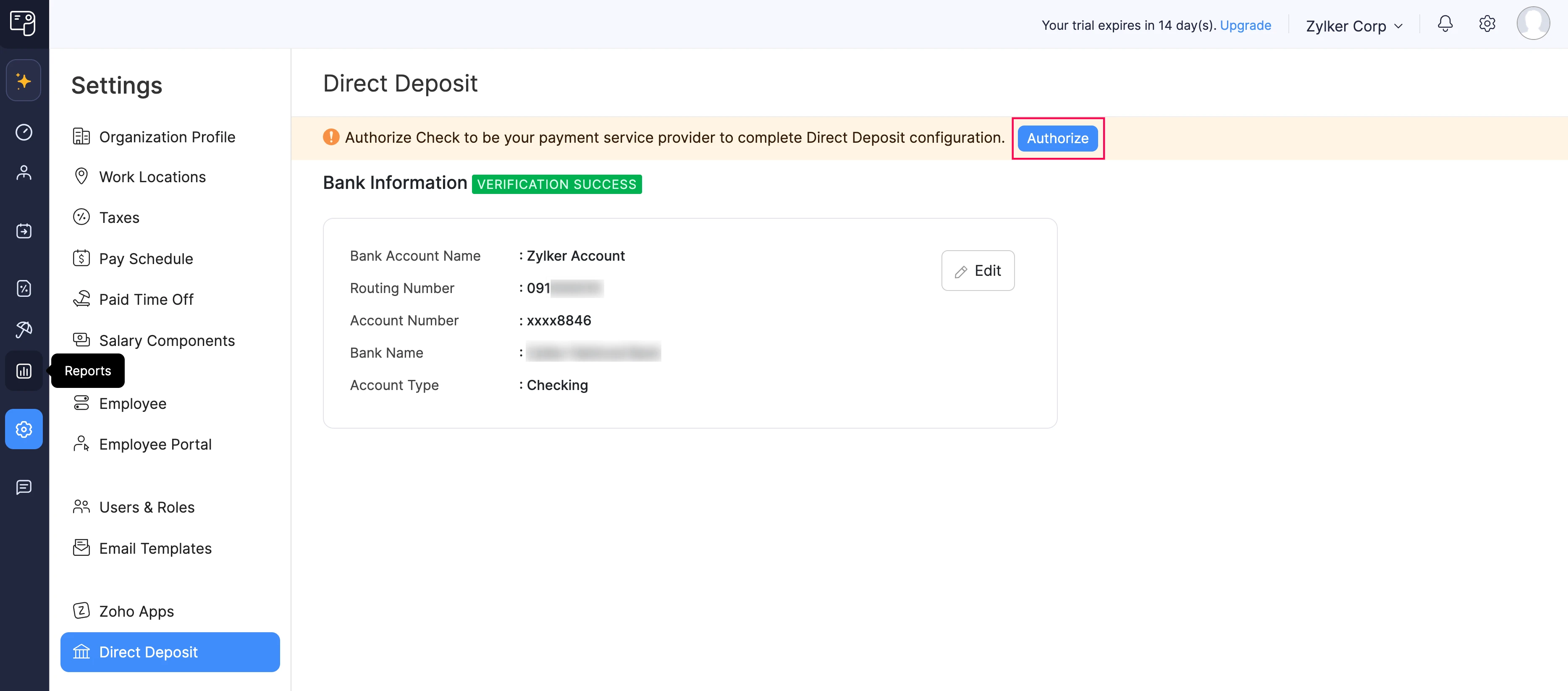
The honest limit here is that verification can fail, and a failed account can't be used. If the $0 payment doesn't go through, any attempt to move money in or out of that account through Zoho Payroll will be rejected, and you'll need to replace it with a new account that goes through the same 2 to 3 business day check. That's the strongest argument for doing this step the day you sign up, well before your first pay run.
Step 2: Authorizing the payment provider is a signature, not a formality
Once your account is verified, someone with authority over it has to give the payment provider permission to debit it. This step catches out small businesses more than any other, because the person setting up payroll is often an office manager or bookkeeper, while the authorization has to come from an owner or someone legally able to sign for the company. If that person is traveling or busy, setup simply stops.
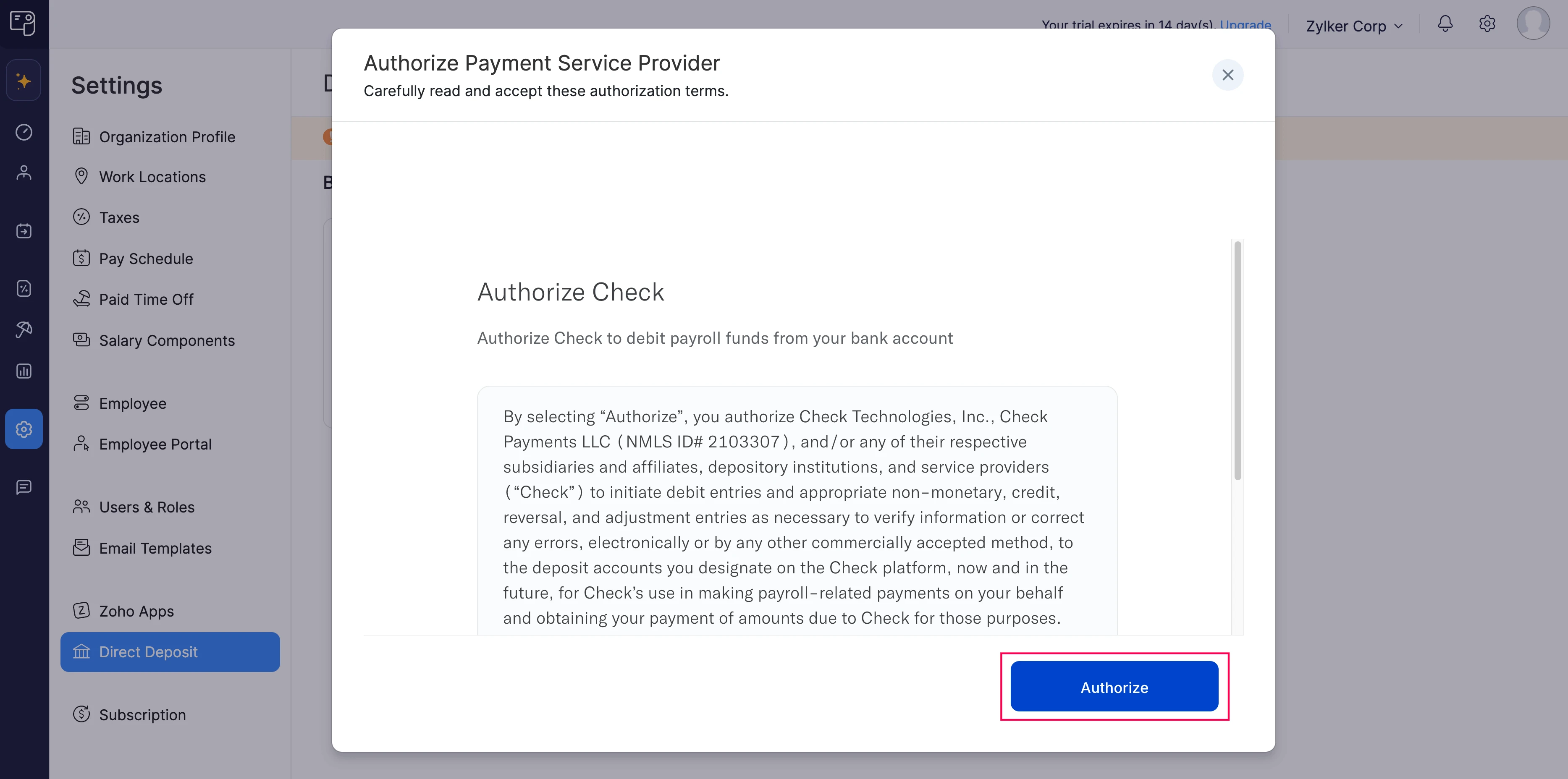
The authorization matters because of what it covers. In Zoho Payroll, every approved payroll debits your account for three things, according to the Direct Deposit for Organizations help doc: the net pay of every employee paid by direct deposit, the federal, state, and local taxes owed to each tax authority, and any child support garnishments owed to the relevant agency. You're authorizing all of that, on every pay run, so it's worth the owner reading the terms rather than clicking through them.
Zoho Payroll only opens the authorization once three things are in place: your pay schedule is configured, your employees are added, and your prior payroll is entered if you're switching mid-year. From the Direct Deposit settings page, the authorized person clicks Authorize, checks the details shown in the popup, clicks Proceed, then reviews the terms and authorizes.
Book fifteen minutes with whoever signs for your business as soon as your employees are in the system; after that, the authorization you need is your employees'.
Step 4: Entering bank details is where most first-payday failures start
A single transposed digit in an account number, or a savings account entered as checking, is enough to fail verification and push an employee's first direct deposit back by days. Because the error is invisible until the bank rejects the test payment, the fix is a process: enter details from the employee's own document rather than retyping from an email, and check each routing number against the bank before you save.
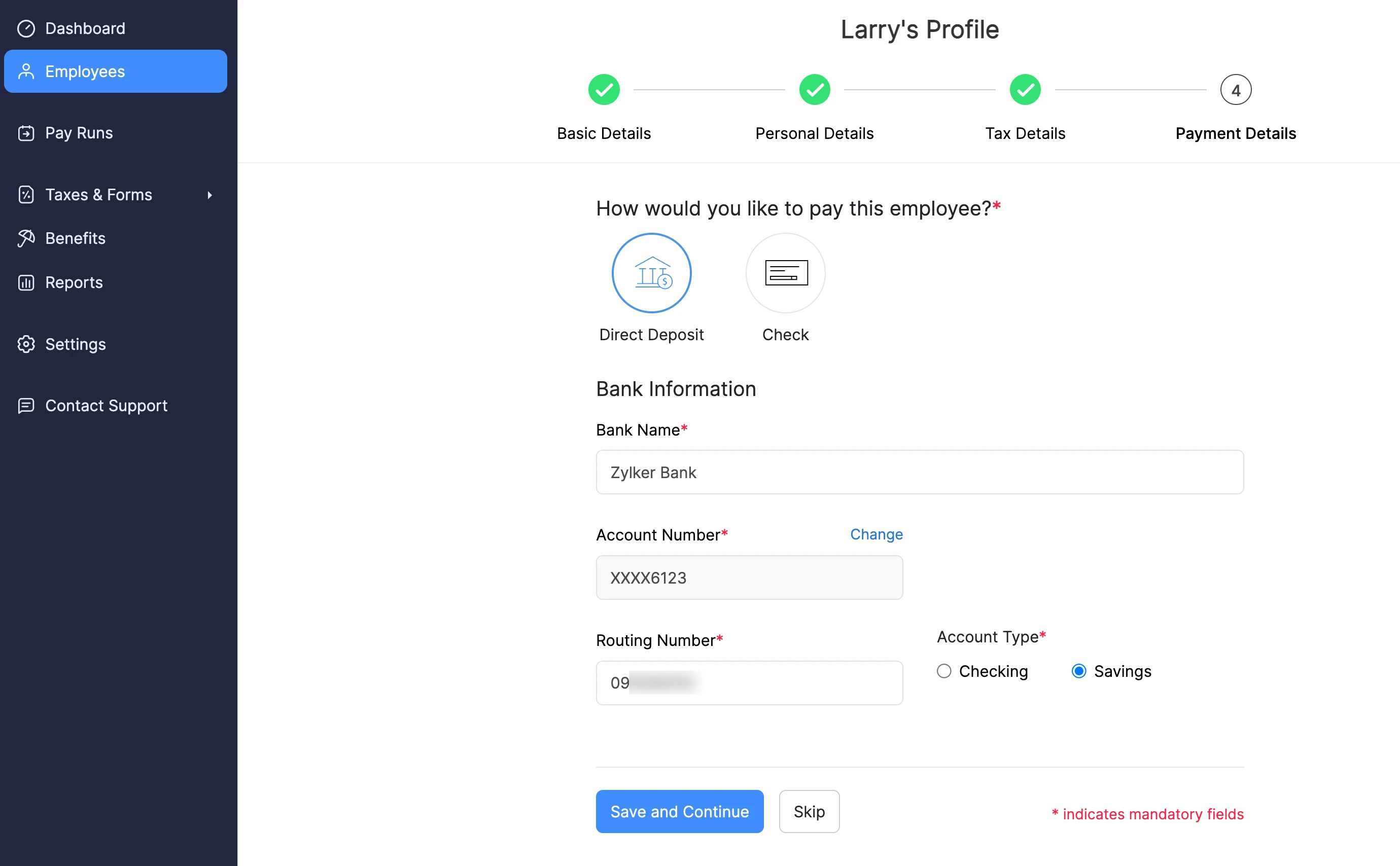
In Zoho Payroll, you can set up direct deposit while adding a new employee or switch an existing employee over. For a new hire, go to Employees, click Add Employee, work through the basic, personal, and tax details, then select Direct Deposit as the payment mode in the Payment Details section and enter the bank name, account number, nine-digit routing number, and account type. The Direct Deposit for Employees help doc walks through each field.
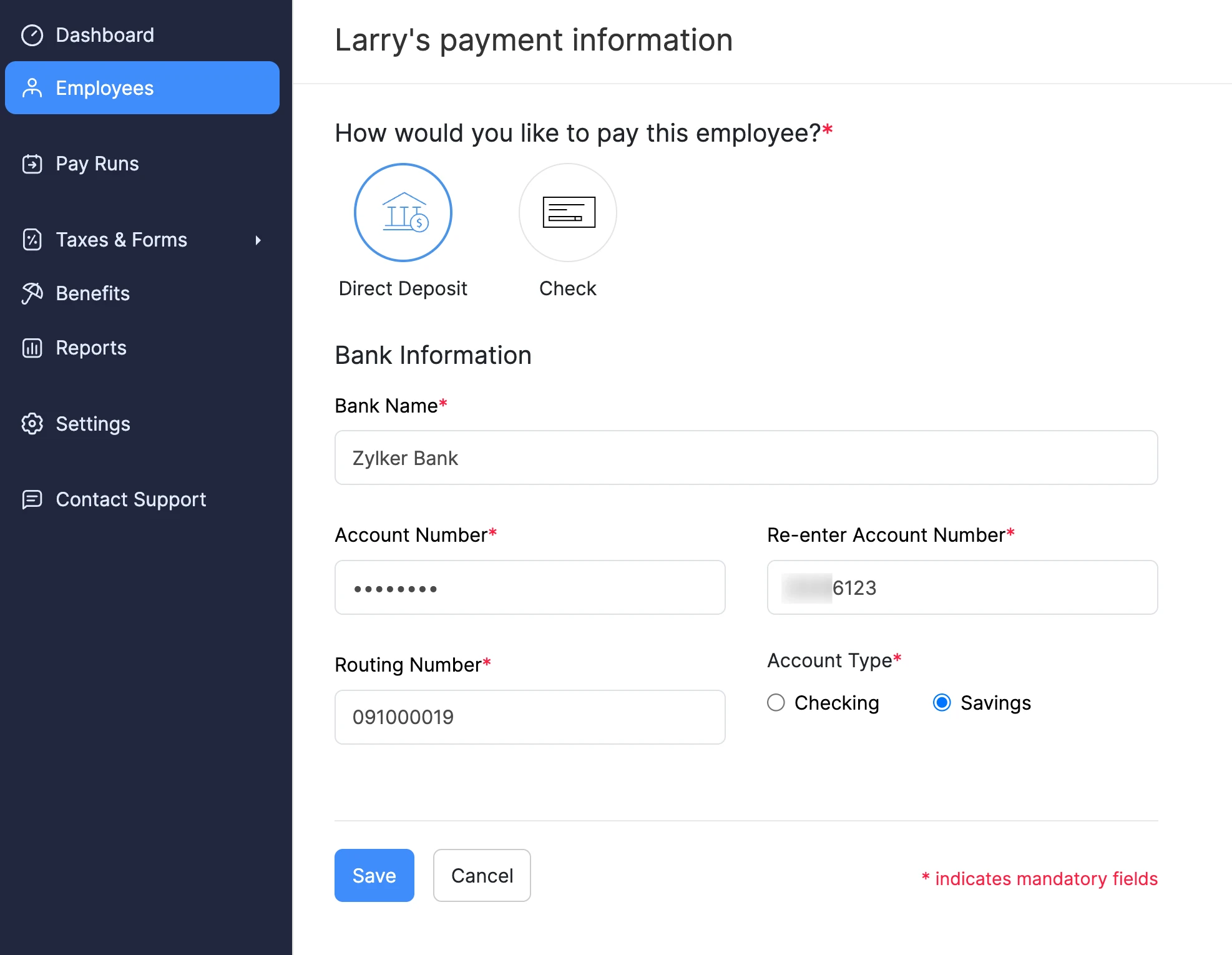
For someone already on payroll, open their profile, click the edit icon in Payment Information, select Direct Deposit, and enter the same four fields. Payment mode is set per employee, so you can move people across gradually and keep paying anyone who prefers a check by check in the meantime.
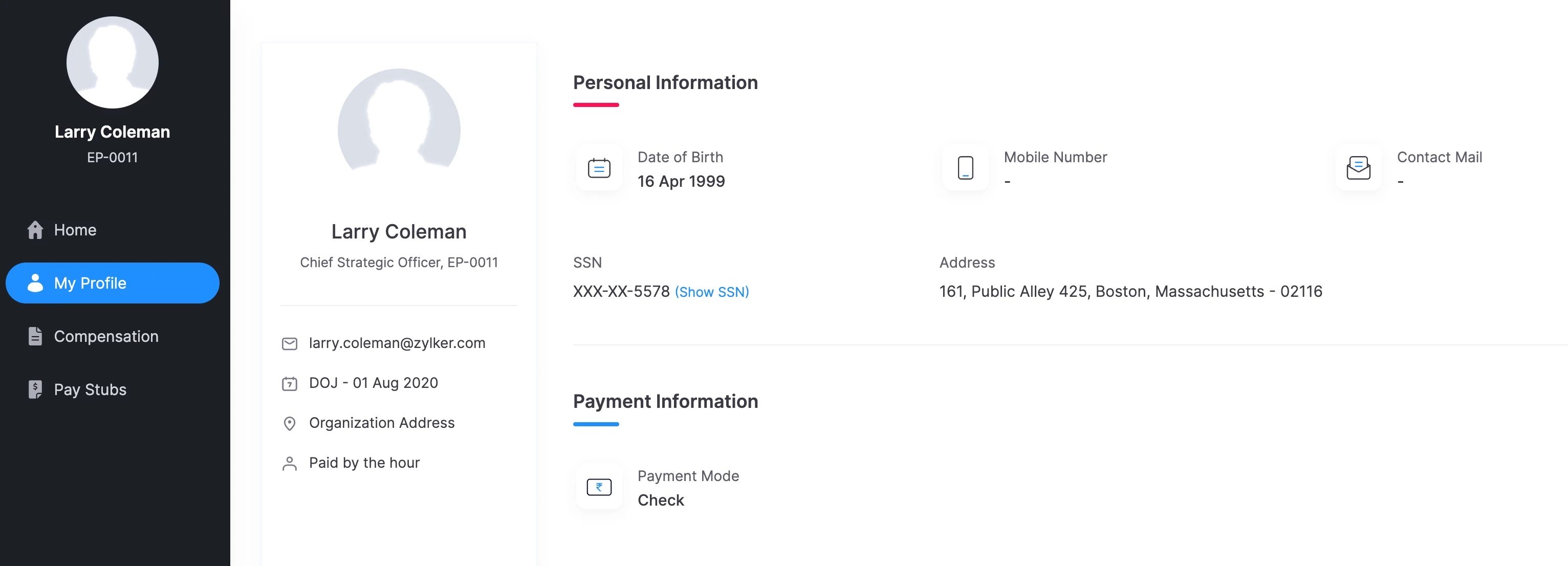
The employee's side of this step is checking your work. In the employee portal, My Profile shows their payment mode, bank name, routing number, account type, and a partially masked account number they can reveal to confirm it, according to the My Profile help doc. Asking each new hire to check this screen in their first week catches typos before verification does.
Once the details are saved, the clock that matters most starts running.
Step 5: Account verification is the step that decides your first direct deposit payday
This is the wait that surprises people. Bank details can be perfect and still not be usable for days, because an account has to prove it can receive ACH entries before it receives real pay. If a new hire's details reach payroll on a Wednesday for a Friday payday, no amount of hurrying will get them paid electronically that week.
The traditional method is a prenote, a zero-dollar entry sent ahead of the first live payment. Prenotes are optional under the ACH rules, but an originator that sends one has to wait three banking days before the first live entry, according to Nacha, the organization that governs the ACH network. Payroll providers that verify accounts automatically work on a similar principle and a similar clock.
Zoho Payroll verifies every employee account the same way it verified yours: it sends a $0 ACH payment when the details are saved, which typically takes 2 to 3 business days. Once the payment succeeds, you can process payroll and pay that employee by direct deposit. If it fails, you update the employee's bank information, and the update triggers another 2 to 3 business days of verification.
Put those numbers next to the approval deadline in the next step and you get a working rule. On the default processing speed, you need an employee's bank details at least six business days before their first payday, which covers three days of verification and three days of approval lead time. If you want room for one failed check, ask for them two weeks out, ideally as part of onboarding paperwork. Our guide to how long setup takes covers the employee's view of the same timeline.
Step 6: Your first pay run runs on a deadline set by your processing speed
Paper checks let you run payroll the evening before payday, but ACH payments settle in batches between banks, so every provider sets an approval deadline some business days ahead. Approve after it and the money can't arrive on time.
In Zoho Payroll, that deadline depends on your processing speed. Every organization starts on the 4 or 3 -day speed, may be moved to 2-day automatically based on payroll history and bank verification, and may become eligible to buy 1-day processing as an add-on for each employee paid by direct deposit, according to the Processing Speeds help doc. For a Friday payday, the timelines look like this:
| Processing speed | How you get it | Approve payroll by | Your account is debited | Employees are paid |
|---|---|---|---|---|
| 3-day | Default for every organization | Tuesday | Thursday | Friday |
| 2-day | Automatic, once eligible | Wednesday | Thursday | Friday |
| 1-day | Paid add-on, once eligible | Thursday | Thursday | Friday |
Two things can still derail a well-timed approval. The first is funding: your account needs enough to cover both salaries and taxes before the debit date, and failed payments from insufficient funds or wrong account details can affect your eligibility for the faster speeds. The second is the calendar. Weekends and US federal bank holidays aren't business days, so when payday lands on one, Zoho Payroll moves payday to the previous business day and moves the approval deadline back with it. Christmas Day 2026 falls on Friday, December 25, according to the Federal Reserve's holiday schedule, so a Christmas payday becomes Thursday, December 24, and on the 3-day speed you'd approve by Monday, December 21. Our holiday payroll calendar lists every shift for the year, and our explainer on when direct deposit goes through covers what employees see on their side.
This is the step where online payroll software earns its keep, since your approval deadline follows from your processing speed and holiday shifts are applied for you, instead of living in someone's head. After the first payroll lands, setup turns into maintenance.
Step 7: Bank changes and exits need a process, not a favor
The setup you just finished will be tested every time someone changes banks. An employee who mentions a new account on Thursday and expects it on Friday's deposit is asking for something the verification clock can't give them, and a payroll admin who rushes the change risks sending pay to a closed account.
The fix is a simple published rule: bank changes take effect from the first payday at least two weeks out, and the old account stays open until the first deposit lands in the new one. In Zoho Payroll, changing an employee's account works like the original setup, by editing their Payment Information, and the new account goes through the same 2 to 3 business day verification before it receives pay.
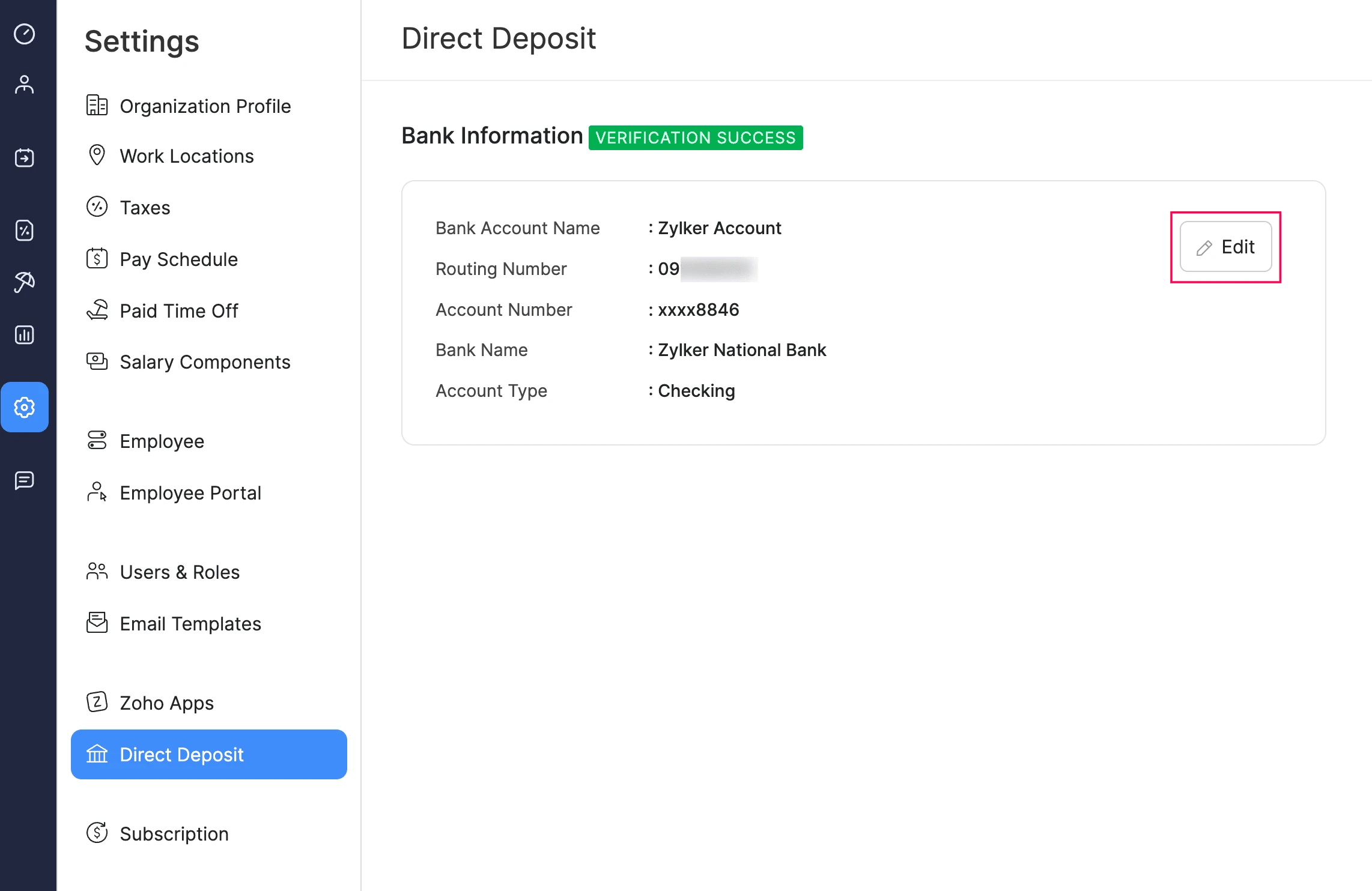
Changing your own business account follows the same logic. From Settings > Direct Deposit, click Edit, update the details, and click Add. Zoho Payroll only re-runs verification when the account number itself changes, so correcting a bank name or account code won't reset the clock, according to the More Actions help doc.
The same discipline applies when someone leaves. If you pay final wages by direct deposit, confirm the account on file is still open before the termination payroll is approved.
What to look for in payroll with direct deposit
If you're still choosing a provider, these four things are worth testing during a trial.
Verification should start on its own, the moment details are saved. Any manual hand-off between entering bank details and testing them adds days to the clock in Step 5. Ask how long verification takes and what happens when it fails.
The approval deadline should be explicit and should tighten as you build history. A provider that publishes its processing speeds and holiday rules lets you plan; one that only says "a few days" leaves you guessing. Zoho Payroll publishes all three speeds and moves eligible organizations to 2-day processing automatically.
Taxes should come out of the same approval as wages. Paying employees electronically while still handling tax deposits by hand keeps half of payday manual. Check that federal, state, and local tax payments, and garnishments where they apply, are part of the same debit.
Employees should be able to authorize and check their own details. Consent collected in a portal is easier to find later than a signed form in a drawer, and an employee who can see their masked account number catches errors faster than an admin can. In Zoho Payroll, both happen in the employee portal and mobile app.
Our overview of direct deposit payroll software [LINK: B1, URL TBD] compares how these criteria play out across plans.
Bank details deserve better protection than an email thread
Direct deposit setup gathers the most sensitive data a small business holds about its people in one place: routing and account numbers sit next to names, addresses, and Social Security numbers. That's the strongest reason to keep the whole process inside your payroll system rather than in inboxes and shared drives.
Zoho Payroll limits who can see and change that data at each step. Employees reach the portal only through an invitation sent to their work email, their account number and SSN appear partially masked until they choose to reveal them, and only a business owner or authorized signer can approve the payment provider that moves the money. [CONFIRM WITH PRODUCT: encryption standard and US data center details for the data residency signal.]
Frequently asked questions
How long does it take to set up direct deposit for employees in the US?
Plan on about two weeks from collecting bank details to the first deposit. In Zoho Payroll, each account takes 2 to 3 business days to verify, and on the default speed you approve payroll three business days before payday, so six business days is the minimum and two weeks leaves room for one failed check.
Can I require employees to use direct deposit?
It depends on your state. Federal law doesn't ban requiring direct deposit, but Regulation E bars any employer from requiring an account at a particular bank, and state rules on consent and alternative payment methods vary. Our guide to state rules on requiring direct deposit [LINK: M6, URL TBD] covers each state.
Do employees need to give me a voided check?
Not necessarily. What you need is the bank name, routing number, account number, and account type, plus the employee's authorization. A voided check or a direct deposit letter from the bank is simply a reliable way to confirm those numbers without retyping them.
Can Zoho Payroll pay some employees by direct deposit and others by check?
Yes. Payment mode is set for each employee, so you can move people to direct deposit one at a time and keep paying anyone who prefers a check by check. The 1-day processing add-on is also bought only for employees paid by direct deposit.
What happens if an employee's bank account fails verification?
The $0 test payment is rejected, and that account can't receive pay through Zoho Payroll. You update the employee's bank details, verification runs again for another 2 to 3 business days, and if payday arrives first you'll need another way to pay them that period.
Start with the business account before the year-end holidays
The best time to begin is before your next busy stretch of paydays, and this year-end has two. Christmas Day and New Year's Day both fall on Fridays, according to the Federal Reserve's holiday schedule, so any Friday payday that lands on either one moves to Thursday, and its approval deadline moves earlier with it. If you want January's new hires paid electronically from their very first payday, get your business account verified and your payment provider authorized now, while the only clock running is your own.
You can do all of it in the US edition of Zoho Payroll during a free trial: add and verify your business account, invite employees to the portal to authorize their deposits, and check your processing speed before you commit to a first pay run. Start your free trial and have your first direct deposit payroll scheduled before the holidays.