
Where can I share my live pages and start accepting payments?
There are several options available to share your live payment pages. To share payment pages:
- Click the Share icon below any payment page in the Payment Pages tab, or select a particular payment page and click Share.
- You can share your payment page in the following ways:
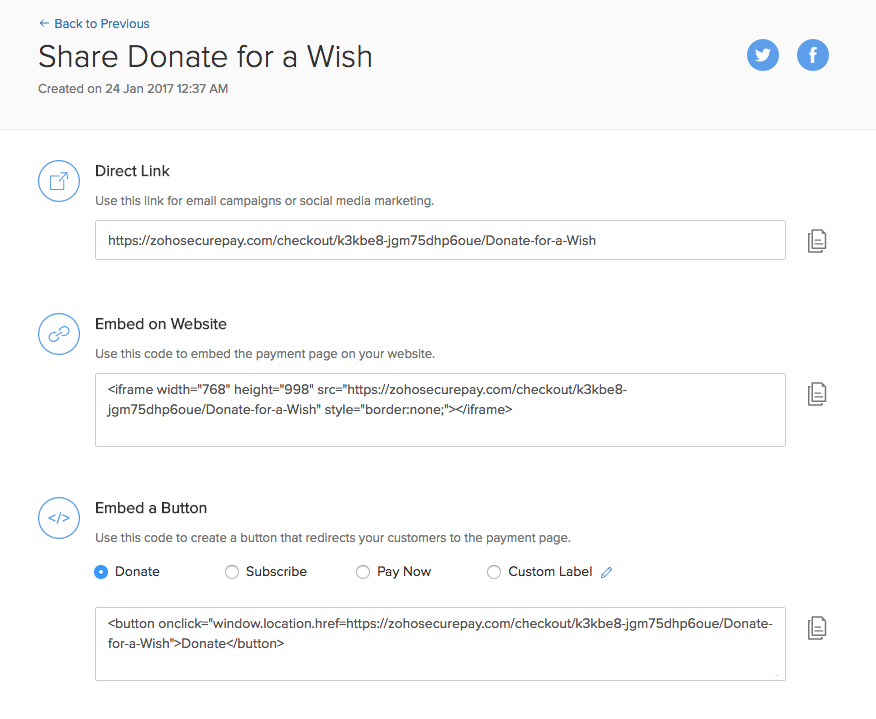
Click the Twitter or Facebook logo to share a link to your social media page.
Click Download QR and the QR code will be downloaded in your device. You can share the QR code with your customers to collect payments.
Click Direct link to copy the page URL and share it through your email or social media campaigns.
Click Embed on Website to copy the page’s HTML code after which you can embed the entire payment page on your website.
Click Embed a Button to copy the HTML code for a button that will redirect to your payment page. You can customize the button text to suit your preferences.
Your payment page will be shared.